Bundle
@hytime/dsh-thinking-effort
为 DSH 的 pi-ai 第三方模型补充可配置的思考强度档位,并设置子 agent 默认思考强度。
- Source
- hytime
- stars
- 23 stars
- License
- MIT
- Updated
- Updated 8 days ago
Readme
# dsh-thinking-effort
A [DSH (DeepSeek Harness)](https://github.com/deepseek-ai/deepseek-harness) plugin that adds configurable reasoning effort levels to hand-declared `llm-pi-ai` models and sets a default reasoning effort for subagents.
[](https://www.npmjs.com/package/@hytime/dsh-thinking-effort)
[](https://www.npmjs.com/package/@hytime/dsh-thinking-effort)
[](https://github.com/hytime/dsh-thinking-effort/blob/main/LICENSE)
- [中文 README](./README.zh.md)
- [日本語 README](./README.ja.md)
- [한국어 README](./README.ko.md)
- [Installation guide](./docs/INSTALL.md)
- [中文安装指南](./docs/INSTALL.zh.md)
- [日本語インストールガイド](./docs/INSTALL.ja.md)
- [한국어 설치 안내](./docs/INSTALL.ko.md)
- [Changelog](./docs/CHANGELOG.md)
- [日本語 changelog](./docs/CHANGELOG.ja.md)
- [한국어 changelog](./docs/CHANGELOG.ko.md)
> **Compatibility note:** DSH `0.1.2-alpha.1` and later accept language-pack locale IDs through `LocaleRuntime`. This plugin registers `ja` and `ko` dynamically, so no DSH core fork is required. Older DSH builds that only expose built-in locale IDs support `zh` and `en` only.
>
> The published runtime entries are `lib/index.js` (Host) and `lib/client.js` (Client). After changing TypeScript or locale sources, run `npm run build` before running DSH or packing the plugin. Current DSH does not expose a public semver metadata contract, so runtime capability detection is authoritative. An optional version is used only when explicit metadata or test input supplies it; unknown valid versions still use the detected capabilities. The plugin supports both modern `remote.settings` and legacy `connection.api.settings`.
## Why use it?
The `llm-pi-ai` adapter supports hand-declared third-party models, but those entries often do not declare `reasoningEfforts`. As a result, Composer does not show a reasoning effort selector, and gateway-specific values such as `ultra` cannot be mapped to DSH's standard levels.
This plugin provides the configuration layer needed to:
- Add default `off`, `high`, and `max` options to models without a declaration;
- Configure reasoning levels per model from the DSH settings page;
- Map a DSH level such as `high` to a gateway value such as `ultra`;
- Set a default reasoning effort for subagents while preserving explicit request values;
- Keep existing user-defined model declarations unchanged.
The plugin is usually unnecessary when you only use built-in DSH models and their reasoning controls already work.
## Identifiers
These identifiers have different responsibilities:
| Identifier | Purpose |
| --- | --- |
| `@hytime/dsh-thinking-effort` | npm package, browser bundle path, loader ID, and host/client runtime ID |
| `thinking-effort` | Cordis composition entry ID and settings Slot ID |
## Features
| Feature | Description |
| --- | --- |
| Default levels | Adds `off`, `high`, and `max` without overwriting custom values |
| Per-model editor | Select levels and configure their gateway values from Settings |
| Gateway mapping | Send `ultra` when the user selects DSH `high` |
| Subagent default | Apply a default effort only when a subagent request has no explicit value |
| Multilingual settings | Includes Chinese, English, Japanese, and Korean dictionaries; Japanese/Korean switching uses DSH language-pack support |
| Version watermark | Show the installed plugin version in the bottom-right corner |
## Install, upgrade, and remove
Use the official DSH CLI to manage the plugin profile. A plain `npm install` does not register a DSH profile bundle.
```bash
# Install the latest version
dsh plugin --profile <profile> add @hytime/dsh-thinking-effort
# Install a specific version
dsh plugin --profile <profile> add @hytime/dsh-thinking-effort@0.1.13
# Upgrade
dsh plugin --profile <profile> update @hytime/dsh-thinking-effort
# Remove
dsh plugin --profile <profile> remove @hytime/dsh-thinking-effort
rm -f "${DSH_HOME:-$HOME/.dsh}/thinking-effort-loaded.json"
```
See [INSTALL.md](./docs/INSTALL.md) for profile discovery, migration, validation, and troubleshooting.
## Quick use
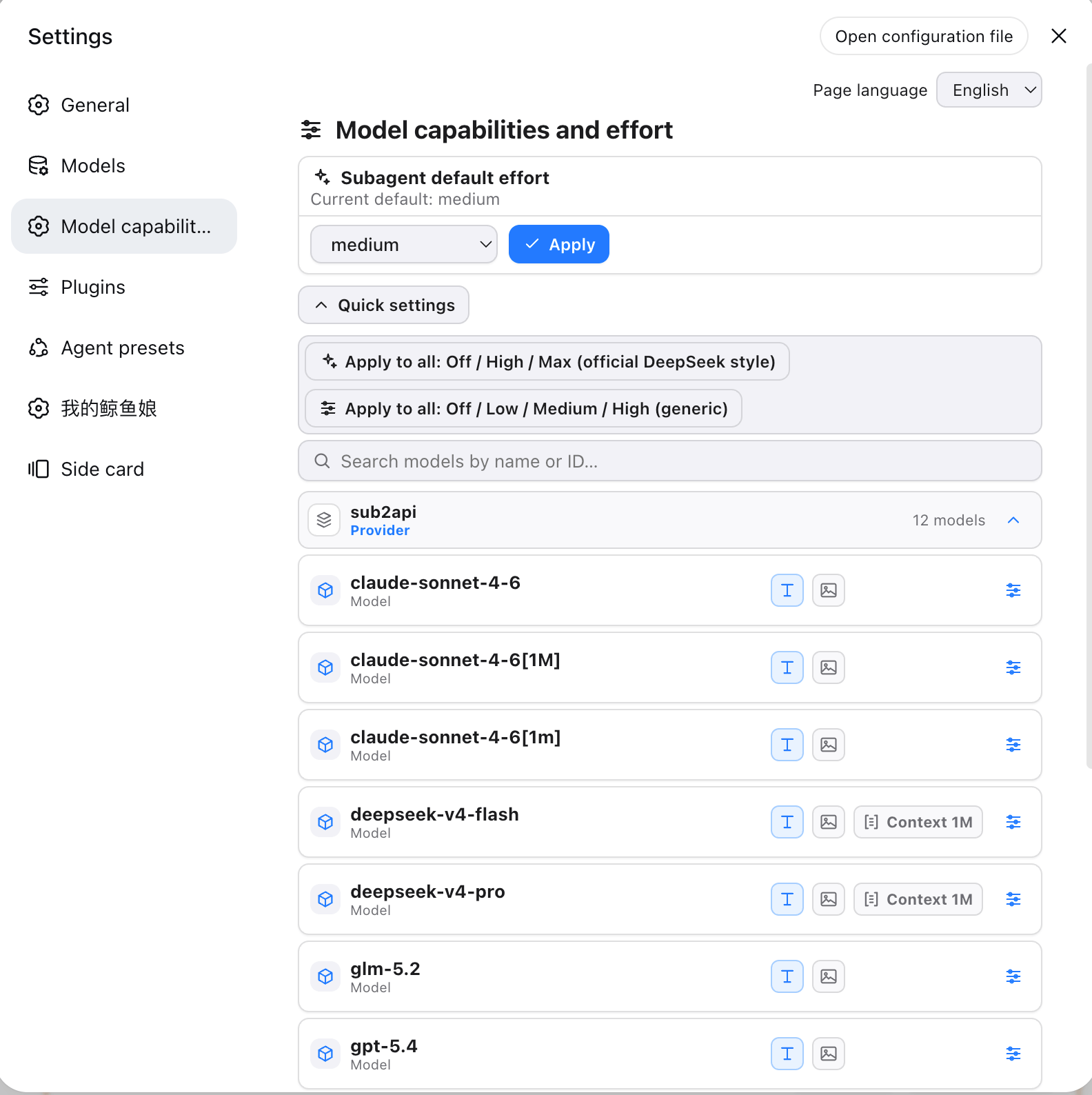
1. Open DSH **Settings → Model capabilities and effort**.
2. Use the **Page language** selector at the top to choose `中文`, `English`, `日本語`, or `한국어`. DSH uses the persisted locale first, then the browser language, then English as the fallback.
3. Choose a subagent default from the **Subagent default effort** card, then click **Apply**.
4. Use **Quick settings** to apply the official DeepSeek or generic preset to all models, or expand a provider and model for detailed configuration.
5. Use the search field to filter models by name or ID. Model rows show text/image input capability badges, a context-window badge when declared, and a settings button for per-model editing.
6. Select a reasoning level and enter the exact gateway value. For example:
| DSH level | Gateway value |
| --- | --- |
| `off` | Leave empty to omit the parameter |
| `high` | `ultra` |
| `max` | `max` |
7. Return to Composer and select the model to use its reasoning selector.
The settings page shows the installed version as a small watermark such as `v0.1.13` in the bottom-right corner.
### Settings page layout
The page header contains the language selector. Below it, the Subagent default effort card controls the default for requests without an explicit effort. The Quick settings controls apply a preset across models. Provider sections can be expanded or collapsed; each model row exposes input capabilities, context length, and a settings control for reasoning levels and gateway values.
## How it works
- **Host:** Scans `llm-pi-ai` `models` and `modelOverrides` on startup and settings changes, adding defaults only where `reasoningEfforts` is missing.
- **Client:** Registers a settings page through the DSH Settings Remote (`ctx.remote.settings`) and the official DSH locale service. Chinese, English, Japanese, and Korean dictionaries are maintained separately in `src/locales/zh.json`, `src/locales/en.json`, `src/locales/ja.json`, and `src/locales/ko.json`, then generated into the client bundle before publishing.
- **Subagents:** Stores the default in the `llm-pi-ai` user layer as `subagentEffort`. The `agent/request` waterfall only fills requests that do not already specify an effort.
- **No configured default:** The plugin does not automatically choose `off`, `high`, or `max`; the request omits `reasoning` and the gateway decides its own default behavior.
## Limitations
- `llm-pi-ai` exposes seven standard levels: `off`, `minimal`, `low`, `medium`, `high`, `xhigh`, and `max`.
- Non-`off` levels require a gateway value. An empty `off` value means that the parameter is omitted.
- The selected subagent level must be supported by the target model, or the gateway may return `UNSUPPORTED_REASONING_EFFORT`.
- `off` and an unset effort may both omit `reasoning`; whether this disables thinking depends on the gateway protocol.
- Host changes require a DSH restart. Settings and locale changes are applied in the browser, with a refresh available when needed.
## CI and release maintenance
- Pull requests and pushes to `main` run the quality matrix on Node `22.19.0` and `24.x`.
- The workflow uses `npm ci`; maintainers must commit `package-lock.json` when dependencies change.
- The ordinary CI workflow does not publish to npm. Publishing is triggered only by a `v<version>` tag through `publish.yml`.
- Before creating a release tag, update `package.json` version and `CHANGELOG.md` files, commit those changes, and create the matching `v<version>` tag. The tag must point to a commit in the `main` history.
- npm Trusted Publishing must be configured for repository `hytime/dsh-thinking-effort` and workflow `publish.yml`. The workflow publishes provenance through GitHub OIDC and does not require `NPM_TOKEN`.
- Before publishing, the workflow builds and tests one representative from each supported DSH compatibility range: `dsh-v0.1.2-alpha.3` (`0.1.2-alpha.3`) for modern and `dsh-v0.1.1-rc.2` (`0.1.1-rc.2`) for legacy, using the official `dsh plugin` command and real compatibility checks.
- The workflow never changes the package version or any `CHANGELOG` file automatically; an existing npm version also blocks publishing.
## License
[MIT](./LICENSE)
Install
dsh plugin --profile web add github:hytime/dsh-thinking-effort#f4ad3bef3d2a6a25e972e61bb36b717352d43888
Profile: web
With the hub plugin installed, ask your agent to install it by name — it resolves the same plan shown here.
dsh plugin --profile web add github:stvlynn/dsh.fish#path:packages/dsh-plugin-hub
install hytime-dsh-thinking-effort from the hub
- This package builds from source on install. pnpm will ask you to allow its build script — that is permission to run the package’s code on your machine, outside the agent sandbox. Only allow sources you trust.