Bundle
dsh-updater-npm
DSH updater + official docs sync plugin for DeepSeek Harness: one-click npm update of @deepseek-ai/dsh with live progress, incremental sync of the official docs/ to local with progress, and dsh_docs_search / dsh_docs_read model tools. DSH 更新器 + 官方文档同步器(进度显示)。
- Source
- SiriusWJ
- stars
- 4 stars
- License
- MIT
- Updated
- Updated 4 hours ago
Readme
# dsh-updater-npm DSH 更新器 + 官方文档同步器 for [DeepSeek Harness (dsh)](https://github.com/deepseek-ai/deepseek-harness)。 设置页提供两个卡片: - **DSH 更新(npm)**:自动检查 `@deepseek-ai/dsh` 的 npm 最新版本,一键 `npm install -g @deepseek-ai/dsh@latest`,带**实时进度显示**(npm 输出流)。 - **DSH 文档(官方)**:把 `deepseek-ai/deepseek-harness` 官方 `docs/` **增量同步**到本地(按 GitHub blob sha 跳过未变文件),带**进度条**(下载 i/total + 当前文件);并提供 `dsh_docs_search` / `dsh_docs_read` 两个模型工具,开发时可直接在对话中查阅官方文档。 [English](#english) · [安装](#安装) · [使用](#使用) · [运行模式](#运行模式) · [License](#license) ## 安装 ```bash # 从 npm 安装(推荐) dsh plugin --profile web add dsh-updater-npm # 或从 GitHub 安装 dsh plugin --profile web add github:SiriusWJ/dsh-updater-npm ``` 安装后重启 dsh web,设置页出现「DSH 更新」和「DSH 文档」两个卡片。 > **多语言**:界面与宿主端消息支持**中文 / English**,自动跟随系统语言切换 > (也可在 设置 → 通用 → Language 手动选择);`dsh_docs_search` / > `dsh_docs_read` 工具描述与输出同样跟随系统语言。 ## 使用 ### DSH 更新 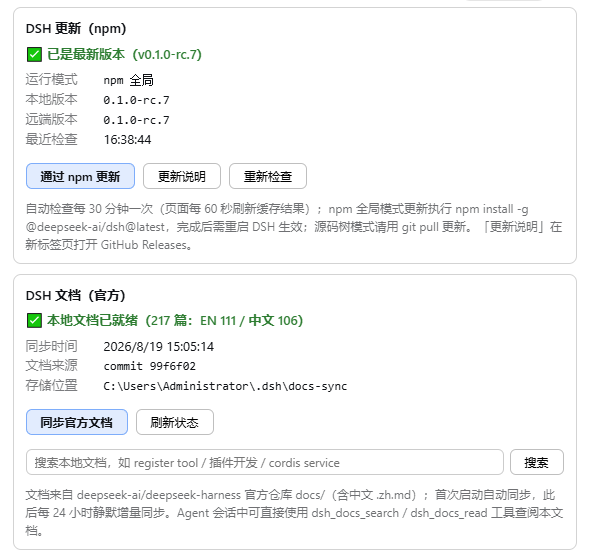 - 自动检查每 30 分钟一次(页面每 60 秒刷新缓存结果)。 - 检测到新版本时,设置页左侧导航「DSH 更新」旁会显示一个**红色小圆点**(🔴)。 - 点击「通过 npm 更新」执行 `npm install -g @deepseek-ai/dsh@latest`,期间显示**实时进度**(npm 输出尾部),完成后出现**「重启 DSH」按钮**——点击后按原启动命令自动退出并重新拉起(**跨平台**:Windows 用 PowerShell,macOS/Linux 用 `/bin/sh`;源码树更新与部署修复完成后同样提供该按钮)。 - 版本比较为 semver 风格:本地比远端新(如 rc.7 vs rc.6)时不会误报更新。 ### DSH 文档 - **同步开关(默认关闭)**:设置页「DSH 文档」卡片顶部有「自动同步官方文档」开关。 关闭(默认)时**不自动同步、不加载 `dsh_docs_search` / `dsh_docs_read` 工具**; 开启后才自动同步(首次启动约 217 篇:英文 + 中文 .zh.md,之后每 24 小时静默增量), 并注册文档工具。开关状态保存在 `$DSH_HOME/plugin-data/dsh-updater-npm/config.json`。 - 点击「同步官方文档」手动同步(需先开启开关),显示**进度条**(已下载/总数 + 当前文件名)与阶段(获取清单 → 下载 → 重建索引)。 - 文档区支持搜索与阅读;对话中也可直接用模型工具: - `dsh_docs_search` —— 搜索本地官方文档索引(中文查询自动优先中文文档) - `dsh_docs_read` —— 读取一篇文档(支持按章节聚焦,80KB 截断,防路径穿越) 文档存储于 `$DSH_HOME/docs-sync/`,索引为 `$DSH_HOME/docs-sync/.index.json`。 ## 运行模式 > **Windows + 缺 PowerShell 7**:DSH 的 shell 工具依赖 `pwsh`(PowerShell 7)。 > 若检测到 Windows 上未安装 pwsh,「DSH 更新」卡片会显示提示和**「一键安装 PowerShell 7」**按钮 > (优先 `winget install Microsoft.PowerShell`,不可用时自动改走官方 win-x64 MSI 静默安装, > 带实时进度;完成后重启 DSH 生效)。 插件会自动识别当前 dsh 的**运行模式**并诚实处理: | 模式 | 识别依据 | 更新方式 | 说明 | | --- | --- | --- | --- | | npm-global | `argv[1]` 为 `<install>/lib/bin.js` | **Windows:staged 更新**(新版本装入独立暂存目录 → 点击「重启 DSH」时无锁原子替换并重启,失败自动回滚旧版);非 Windows:原地 `npm install -g`,完成后点「重启 DSH」 | 正常部署场景;**Windows 上更新目标即运行实例自身(含 native 依赖),原地 npm install 会撞 EBUSY 导致半拆半装**——staged 流程全程不触碰运行中的部署目录,替换时旧目录先改名备份(`.old-*`),新包校验失败自动恢复当前版本;重启脚本会先校验暂存新包(不通过则放弃整个操作、进程不退出);每次启动检测部署目录完整性,损坏时提示「修复部署」一键重装当前版本(同样手动重启) | | source(源码树) | `argv[1]` 含 `bin.ts` / `tsx` / `apps/` | **源码树更新**:`git fetch` → `git pull --ff-only` → 安装依赖(pnpm/npm) | 源码树运行(如 `pnpm dsh web`)时 npm -g 不影响运行实例;设置页显示分支/本地与远端提交/落后数,一键更新;工作区有未提交修改或未安装 git 时会明确提示并禁用按钮 | > **多副本保护**:环境里可能有多个 dsh 副本(多个 Node 安装的全局目录、DSH profiles 等)。 > 插件只更新**当前运行的这个**:优先用当前实例所属 Node 安装自带的 npm 执行(避免 PATH > 上的 npm 属于别的 Node 而把更新写到别处);`/check` 会列出检测到的其他副本并显示警告; > 若 npm 执行成功但当前副本版本没变(更新落空),会明确报错而不是假成功。 > 副本检测按 **realpath 去重**:指向运行实例的 junction/符号链接(如 > `$DSH_HOME/profiles/node_modules` 里的依赖镜像)不会误报为独立副本。 > 版本回退排查:若"更新后显示一致、重启后回到旧版",说明运行的是源码树而 npm 更新只改了全局安装。切换为 npm-global 启动(如桌面快捷方式指向 `D:\tools\node22\dsh.cmd web`)后更新即生效。 ## 路由 - `GET /dsh-updater-npm/check` —— 更新检查(10 分钟缓存) - `POST /dsh-updater-npm/update` —— 执行 npm 更新(同源保护) - `POST /dsh-updater-npm/restart` —— 重启当前 DSH 实例(同源保护;若有待交换暂存包则先原子替换部署再重启,支持 Windows/macOS/Linux) - `GET /dsh-updater-npm/progress` —— 更新/同步实时进度(轮询) - `GET /dsh-updater-npm/docs/status` —— 文档同步状态 - `POST /dsh-updater-npm/docs/sync` —— 触发文档同步(同源保护) - `GET /dsh-updater-npm/docs/search?q=&lang=&limit=` —— 本地索引搜索 - `GET /dsh-updater-npm/docs/read?path=§ion=` —— 读取文档 ## License [MIT](LICENSE) --- ## English **dsh-updater-npm** is a DSH updater + official docs sync plugin for [DeepSeek Harness](https://github.com/deepseek-ai/deepseek-harness): - **DSH Update (npm)**: check the latest `@deepseek-ai/dsh` on npm, one-click `npm install -g @deepseek-ai/dsh@latest`, with **live progress** (npm output stream); after the update a **"Restart DSH"** button appears — it exits the current process and relaunches with the original command line (PowerShell on Windows, `/bin/sh` on macOS/Linux; also shown after source-tree updates and deployment repair). - **DSH Docs (official)**: incrementally sync `deepseek-ai/deepseek-harness` `docs/` to `$DSH_HOME/docs-sync/` (skips unchanged files by GitHub blob sha) with a **progress bar**, plus `dsh_docs_search` / `dsh_docs_read` model tools for in-conversation doc lookup. The plugin detects the **run mode**: `npm-global` (normal; npm update applies directly) or `source` (source-tree, e.g. `pnpm dsh web`; npm update is refused with a warning because it does not affect the running instance — use `git pull` instead). **i18n:** UI and host messages support **Chinese / English**, following the system language automatically (or the manual choice in Settings → General → Language); the `dsh_docs_search` / `dsh_docs_read` tool descriptions and outputs follow the system language too. **Install:** ```bash dsh plugin --profile web add dsh-updater-npm # or dsh plugin --profile web add github:SiriusWJ/dsh-updater-npm ```
Install
dsh plugin --profile web add github:SiriusWJ/dsh-updater-npm
Profile: web
With the hub plugin installed, ask your agent to install it by name — it resolves the same plan shown here.
dsh plugin --profile web add github:stvlynn/dsh.fish#path:packages/dsh-plugin-hub
install dsh-updater-npm from the hub
- This source has no pinned commit, so a later push upstream changes what installs. Prefer pinning a commit.