Bundle
dsh-tui-mcp-manager
Native full-screen MCP manager for dsh-TUI
- Source
- 0N3-0
- License
- MIT
- Updated
- Updated 8 days ago
Readme
# dsh-tui-mcp-manager
[](https://github.com/0N3-0/dsh-tui-mcp-manager/actions/workflows/ci.yml)
[](https://www.npmjs.com/package/dsh-tui-mcp-manager)
[](LICENSE)
[English](README_EN.md) | 中文
在 [dsh-TUI](https://github.com/ccch1mneyyy/dsh-TUI) 中集中管理 MCP 服务器、Set、工具与运行状态。
无需离开终端,输入 `/mcp-manager` 即可打开全屏界面。
## 安装
需要 Node.js `^22.19 || >=24` 和 dsh-TUI `>=0.9.3 <0.10.0`。
```sh
dsh plugin --profile dsh-tui add dsh-tui-mcp-manager
dsh --profile dsh-tui
```
进入 TUI 后运行 `/mcp-manager`。界面语言跟随 dsh-TUI,可用 `/lang zh` 或 `/lang en` 切换。
## 预览
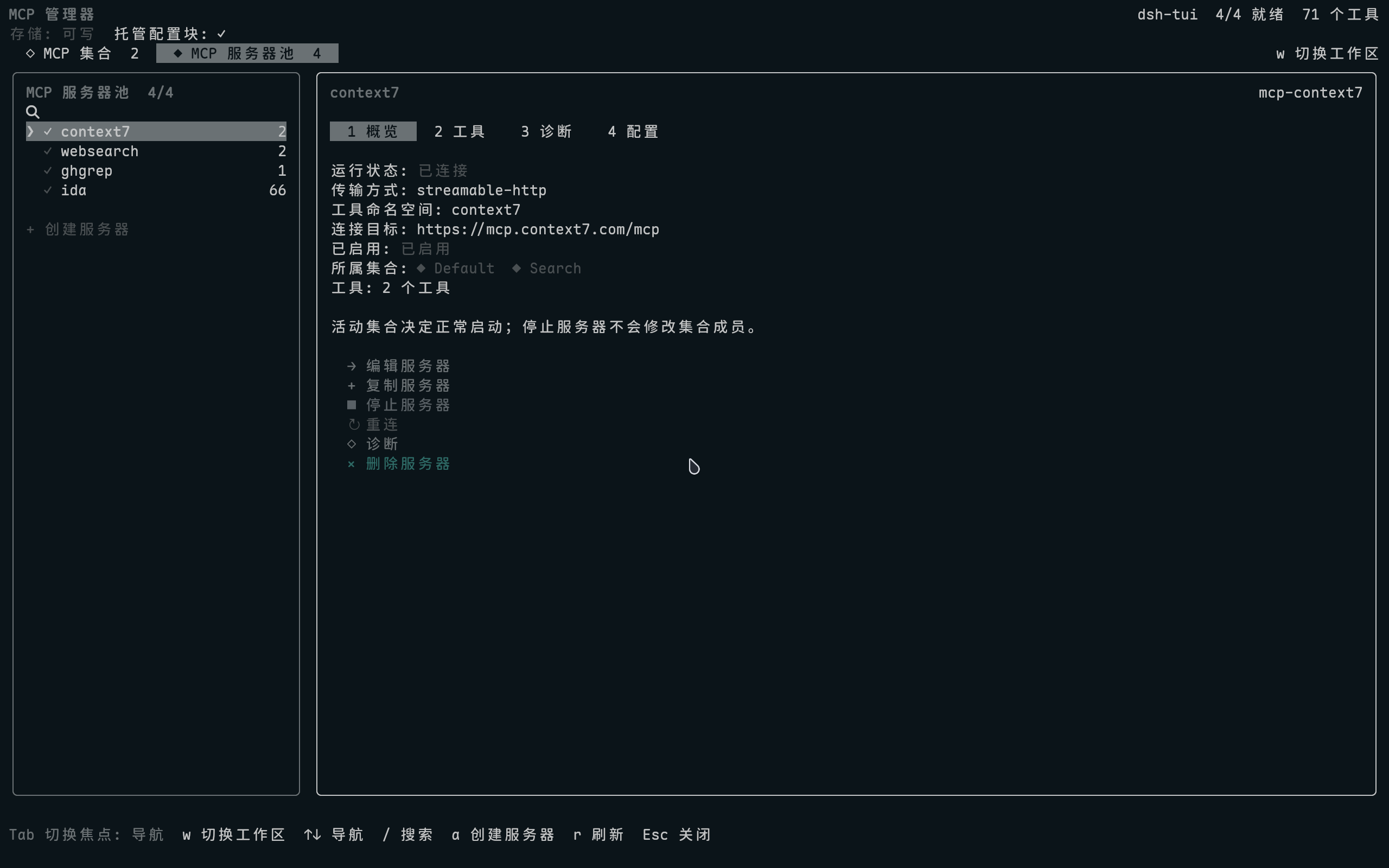
<details>
<summary>更多界面截图</summary>
[Set 管理](https://raw.githubusercontent.com/0N3-0/dsh-tui-mcp-manager/main/docs/images/mcp-manager-sets.png) ·
[工具与 Schema](https://raw.githubusercontent.com/0N3-0/dsh-tui-mcp-manager/main/docs/images/mcp-manager-tools.png) ·
[创建 Set](https://raw.githubusercontent.com/0N3-0/dsh-tui-mcp-manager/main/docs/images/mcp-manager-set-editor.png) ·
[创建服务器](https://raw.githubusercontent.com/0N3-0/dsh-tui-mcp-manager/main/docs/images/mcp-manager-server-editor.png)
</details>
## 核心能力
| 区域 | 能力 |
| --- | --- |
| 服务器池 | 创建、复制、编辑、停止、重连和全局删除服务器 |
| MCP Sets | 编排成员、独立启停、设置启动时状态,并对跨 Set 成员自动去重 |
| 工具 | 浏览工具说明与输入 Schema,按名称或说明搜索 |
| 诊断 | 打开页面即自动检查配置、连接、运行时和工具注册 |
| 凭据 | 通过 DSH credentials 引用敏感环境变量与请求头 |
服务器、Set 和工具列表都支持 `/` 搜索。服务器概览还会显示它所属的全部 Set:`◆` 表示活动,`◇` 表示未活动。
### Set 如何生效
实际运行的服务器是所有活动 Set 成员的并集。重复成员只会启动一次:
```text
Set A: context7, websearch
Set B: websearch, ghgrep
运行: context7, websearch, ghgrep
```
首次使用时会生成包含现有 MCP 的 `Default` Set;保存后它就是普通 Set。停止服务器只影响当前进程,不会改变 Set 成员关系;也可以随时原地恢复。
## 按键
| 按键 | 操作 |
| --- | --- |
| `Tab` | 切换左侧导航与右侧详情焦点 |
| `↑` / `↓` | 选择节点、操作、字段或工具 |
| `←` / `→` | 切换详情标签或移动输入光标 |
| `Enter` | 打开、编辑或确认 |
| `/` | 搜索当前列表 |
| `w` | 切换 Set 与服务器池 |
| `Esc` | 返回或取消 |
## 配置与安全
- 服务器配置直接读写当前 profile 的 `cordis.patch.yml`,不维护第二份数据库。
- Set 保存在同目录的 `mcp-manager.sets.yml`,只记录 Set 信息和服务器 ID。
- 写入使用旁路锁、`fsync` 和原子 rename;managed block 外的内容保持不变。
- 删除服务器时会同步清理所有 Set 引用。
- 敏感值只写入 credentials provider,配置文件中仅保留引用。
<details>
<summary>诊断与运行时细节</summary>
诊断页会检查 Loader/Fiber、可执行文件或 URL、工作目录、凭据、连接和工具数。未处于活动 Set 的服务器会临时启用已有 Loader 配置完成握手,读取状态后立即停止;不会修改 Set 或配置文件。
“停止服务器”同样只停用当前进程中的 Loader 行。配置或 profile 重载后,临时停止状态会自动失效。
</details>
<details>
<summary>配置写入与凭据引用</summary>
插件只修改 `cordis.patch.yml` 中由以下 marker 包围的区块,兼容旧 marker、row prefix 和 metadata key:
```yaml
# >>> dsh-mcp-manager: managed MCP server rows >>>
# managed MCP server rows
# <<< dsh-mcp-manager: managed MCP server rows <<<
```
敏感字段在 patch 中只保留引用,例如:
```yaml
secretHeaders:
api-key:
ref: MY_CONTEXT7_KEY
prefix: ''
```
真实值不会出现在服务器概览、profile patch 或 RPC snapshot 中。
</details>
## 更新与卸载
重新执行安装命令即可更新。卸载使用:
```sh
dsh plugin --profile dsh-tui remove dsh-tui-mcp-manager
```
<details>
<summary>从源码开发</summary>
```sh
git clone https://github.com/0N3-0/dsh-tui-mcp-manager.git
cd dsh-tui-mcp-manager
pnpm install --frozen-lockfile
pnpm check
dsh plugin --profile dsh-tui add .
```
常用发布前检查:
```sh
pnpm check
npm pack --dry-run
pnpm smoke:package
```
本地 `add .` 仅用于开发联调;普通用户无需 clone 或构建仓库。
</details>
## 兼容性
当前构建与运行基线为 dsh-TUI 0.9.3。项目采用纯 ESM 和 MIT 许可证;发布由 GitHub Actions OIDC Trusted Publishing 完成。
插件运行在宿主进程内。manifest 权限用于宿主审计与策略声明,不是操作系统安全沙箱。
## License
[MIT](LICENSE) © 2026 0N3-0
Install
dsh plugin --profile web add github:0N3-0/dsh-tui-mcp-manager
Profile: web
With the hub plugin installed, ask your agent to install it by name — it resolves the same plan shown here.
dsh plugin --profile web add github:stvlynn/dsh.fish#path:packages/dsh-plugin-hub
install dsh-tui-mcp-manager from the hub
- This package builds from source on install. pnpm will ask you to allow its build script — that is permission to run the package’s code on your machine, outside the agent sandbox. Only allow sources you trust.
- This source has no pinned commit, so a later push upstream changes what installs. Prefer pinning a commit.