Bundle
dsh-sync-plugin
DeepSeek Harness 多电脑同步:通过自己的 GitHub 仓库同步会话、附件、设置和工作区文件。Sync DSH sessions, settings and workspace files across computers.
- Source
- dpskk2
- stars
- 1 stars
- License
- MIT
- Updated
- Updated yesterday
Readme
# DSH Sync · 换台电脑,接着做 **把 DeepSeek Harness 的会话、附件、设置和工作区文件,同步到你的另一台电脑。** 数据通过你自己的 GitHub 仓库传输。推荐使用私有仓库;默认手动同步,也可开启自动同步。 [](https://www.npmjs.com/package/dsh-sync-plugin) [](https://github.com/dpskk2/dsh-sync-plugin/blob/main/LICENSE) [开始使用](#开始使用) · [接入第二台电脑](#接入第二台电脑) · [常见问题](https://github.com/dpskk2/dsh-sync-plugin/blob/main/docs/getting-started.md#常见问题) · [English](https://github.com/dpskk2/dsh-sync-plugin/blob/main/README.en.md) 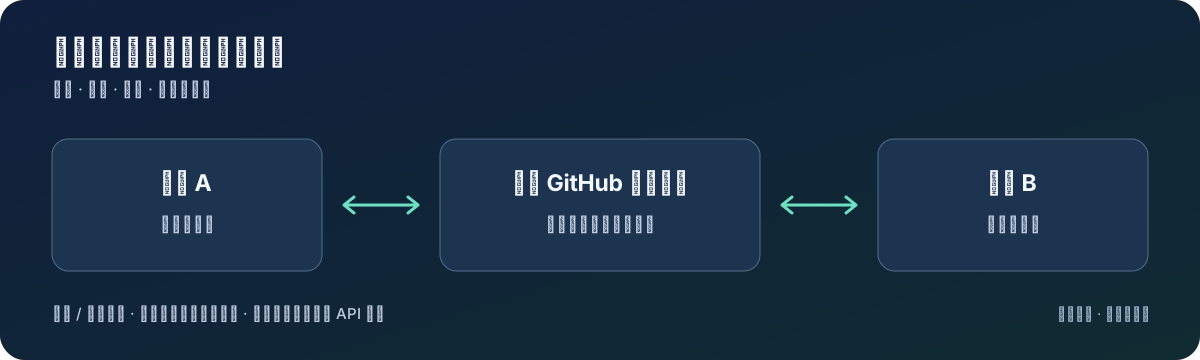 ## 什么时候用得上 - **台式机切到笔记本**:出门前同步,另一台电脑取回会话和工作区文件,继续处理同一个项目。 - **重装或换电脑**:从自己的仓库取回已同步的数据,再配置这台机器的 API 密钥与依赖。 - **少做重复配置**:模型设置、字号、插件清单随数据同步;插件依赖仍需在新机器安装。 这是面向个人多机使用的同步插件。两台电脑交替使用时,建议**开始前同步一次,结束后再同步一次**。它不是实时协同编辑,也不是独立的灾难备份。 ## 开始使用 需要能正常运行的 **DSH Web**、[Git](https://git-scm.com/downloads),以及可访问 GitHub 的网络。推荐安装 [GitHub CLI](https://cli.github.com/)(`gh`),用于登录和自动建仓。完整环境说明见[安装指南](https://github.com/dpskk2/dsh-sync-plugin/blob/main/docs/getting-started.md)。 ### 1. 安装插件 ```sh dsh plugin --profile web add dsh-sync-plugin ``` 重启 DSH。侧栏左下角会出现 **「⟳ 同步」**,设置里会出现 **「同步」** 页面。 ### 2. 登录 GitHub 在运行 DSH 的同一台电脑、同一系统用户下执行: ```sh gh auth login gh auth status ``` 登录时选择 GitHub.com 和 HTTPS。已有同名 `dsh-sync` 仓库时,**先确认它是你准备用于同步的私有仓库**。 ### 3. 点一次「⟳ 同步」 没有配置仓库地址时,插件会尝试通过 `gh` 创建或复用账号下的 `dsh-sync` 仓库,并保存配置。新建仓库使用私有可见性。 打开 **设置 → 同步**,确认显示了仓库地址、同步完成,且没有工作区失败信息。只有“本地快照”说明尚未上传到另一台电脑可访问的仓库。 > 默认也会上传工作区文件。如果只想同步会话与设置,在首次同步前关闭设置页的「同步工作区文件」。不使用 `gh`、已有仓库或需要 SSH?见[手动连接仓库](https://github.com/dpskk2/dsh-sync-plugin/blob/main/docs/getting-started.md#手动连接仓库)。 ## 接入第二台电脑 1. 在第二台电脑安装 DSH、Git、`gh` 和本插件,重启 DSH。 2. 用**同一个 GitHub 账号**执行 `gh auth login`。如果第一台使用默认的 `dsh-sync` 仓库,点同步即可尝试复用它;自定义仓库则填写与第一台相同的 `remote`。 3. 点「⟳ 同步」,检查设置页的仓库地址与结果。同步成功后,重新启动 DSH,让取回的设置和会话索引加载完整。 4. 在第二台配置 API 密钥,并按需安装插件和项目依赖。工作区位置不合适时,使用同步结果中的「换位置」。 **验证接通:**在 A 创建一条测试会话 → A 同步 → B 同步 → 在 B 找到这条会话。再从 B 新建一条会话同步回 A,验证双向传输。 > 专用凭据文件 `.credentials.yaml` 排除同步,但聊天、附件或项目文件里的密钥仍可能上传。首次同步前请查看[同步范围、排除方法与合并边界](https://github.com/dpskk2/dsh-sync-plugin/blob/main/docs/sync-content.md)。 ## 日常使用 - **手动同步**:侧栏「⟳ 同步」或设置页「立即同步」。 - **自动同步**:设置 → 同步 → 同步偏好,保存为自动模式后重启 DSH。默认约每 5 分钟同步,并响应会话活动。 - **遇到问题**:先看设置页的同步详情,再查[排障指南](https://github.com/dpskk2/dsh-sync-plugin/blob/main/docs/getting-started.md#常见问题)。 ```sh # 升级后重启 DSH dsh plugin --profile web update dsh-sync-plugin # 卸载插件 dsh plugin --profile web remove dsh-sync-plugin ``` 卸载插件不会自动删除已有的本地数据或 GitHub 同步仓库。 ## 继续了解 - [安装、换机与排障](https://github.com/dpskk2/dsh-sync-plugin/blob/main/docs/getting-started.md) - [配置参考](https://github.com/dpskk2/dsh-sync-plugin/blob/main/docs/configuration.md) - [同步内容与合并边界](https://github.com/dpskk2/dsh-sync-plugin/blob/main/docs/sync-content.md) - [补丁管理](https://github.com/dpskk2/dsh-sync-plugin/blob/main/docs/configuration.md#补丁管理) - [开发与验证](https://github.com/dpskk2/dsh-sync-plugin/blob/main/CONTRIBUTING.md) - [更新记录](https://github.com/dpskk2/dsh-sync-plugin/blob/main/CHANGELOG.md) - [报告问题 / 提出建议](https://github.com/dpskk2/dsh-sync-plugin/issues) 如果它帮你省去了换机搬运数据的麻烦,欢迎 Star 或分享你的使用场景。反馈安装卡在哪一步,同样很有帮助。
Install
dsh plugin --profile web add github:dpskk2/dsh-sync-plugin#2c273dcdf9d54e8aabff39e3bd61bc826c8b193c
Profile: web
With the hub plugin installed, ask your agent to install it by name — it resolves the same plan shown here.
dsh plugin --profile web add github:stvlynn/dsh.fish#path:packages/dsh-plugin-hub
install dsh-sync-plugin from the hub