Bundle
dsh-second-opinion
Independent second-model reviews for DeepSeek Harness assistant decisions
- Source
- scwlkq
- License
- MIT
- Updated
- Updated 16 hours ago
Readme
# DSH Second Opinion
[简体中文](README.zh.md)
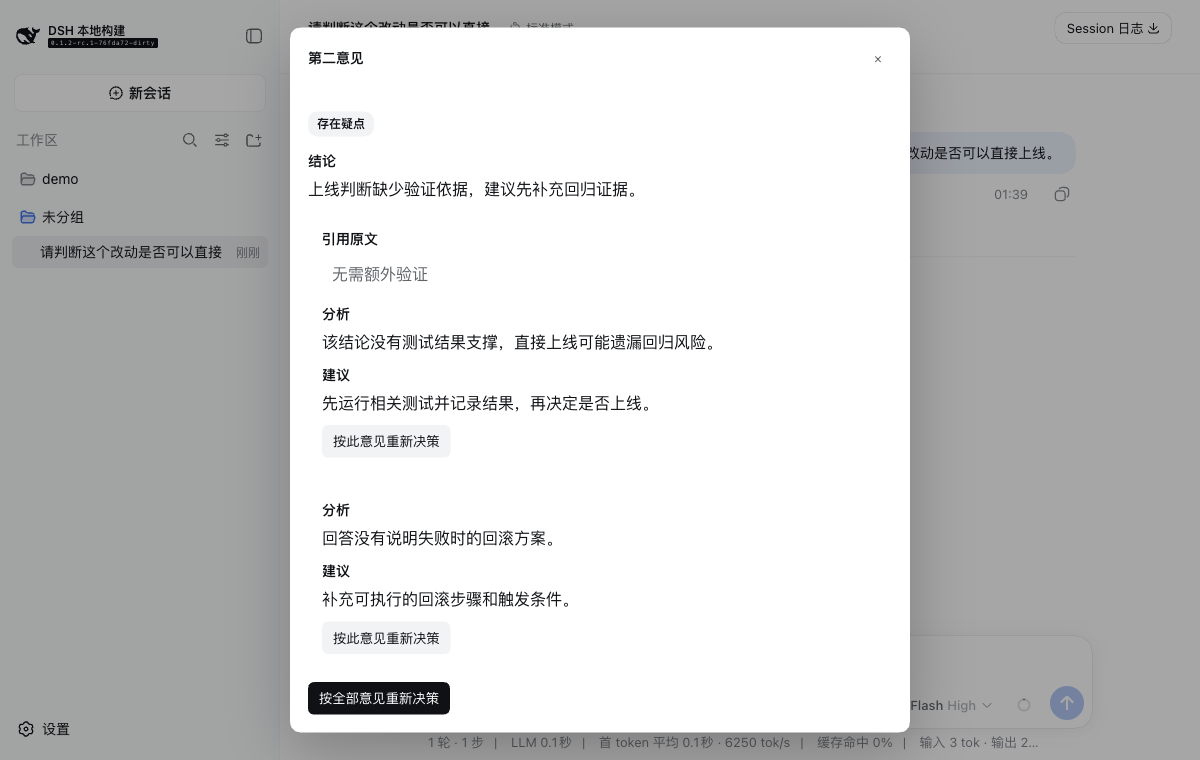
`dsh-second-opinion` adds an asynchronous second-model review to DeepSeek Harness. The primary model's answer is committed immediately; a reviewer model then checks the completed assistant message, records quote-anchored concerns, and optionally asks the primary model to reconsider.
## Features
- Reviews each committed assistant message without delaying or failing the primary turn.
- Runs reviews serially within one Session and concurrently across Sessions.
- Supports advisory review and bounded automatic reconsideration.
- Anchors comments to exact quoted text and keeps general comments when no quote applies.
- Persists pending, completed, and failed reviews in a Storage Domain sidecar.
- Exposes retry, per-comment reconsideration, and whole-review reconsideration in the Web UI.
- Gives the reviewer no primary-agent tools, so a review cannot perform tool side effects.
## Requirements
- DeepSeek Harness `0.1.2-rc.1` (the tested release target)
- Node.js `^22.19.0 || >=24.0.0`
- `pnpm` available to the `dsh plugin` command
## Installation
Install the published npm package into the Web profile:
```bash
dsh plugin --profile web add dsh-second-opinion
```
Or install the current GitHub source:
```bash
dsh plugin --profile web add github:scwlkq/dsh-second-opinion
```
Restart the DSH Web process after installation. The bundle activates both the Host plugin and its browser contribution.
## Usage
The default `advisory` mode needs no extra configuration. Start DSH, send a prompt, and open the speech-bubble action under a completed assistant message. The dialog first shows `Review pending`, then the reviewer verdict and comments. You can send one comment or the complete review back to the primary agent for reconsideration.
```bash
dsh --profile web
```
The reviewer route defaults to the provider and model that produced the target message. Set both reviewer route variables to use a dedicated B model:
```bash
export DSH_REVIEW_PROVIDER='<provider-id>'
export DSH_REVIEW_MODEL='<model-id>'
dsh --profile web
```
## Modes
| Mode | Behavior |
| --- | --- |
| `advisory` | Stores and displays the review. A person chooses whether to reconsider one comment or the complete review. This is the default. |
| `auto` | When the verdict is `concern` or `disagree`, automatically steers the primary agent to reconsider. The original answer remains in the transcript. |
Enable automatic reconsideration for the bundle layer:
```bash
export DSH_REVIEW_MODE=auto
dsh --profile web
```
Automatic reconsideration is limited by `autoRevisionsPerTurn` and does not review the plugin's own advice chain, preventing an unbounded review loop.
If the Session advances before a slow review completes, the result remains available as advice but is not injected into the newer task.
## Configuration
The bundle reads these environment variables at profile startup:
| Environment variable | Default | Meaning |
| --- | --- | --- |
| `DSH_REVIEW_MODE` | `advisory` | Selects `advisory` or `auto`. |
| `DSH_REVIEW_PROVIDER` | unset | Reviewer provider ID. Must be set together with `DSH_REVIEW_MODEL`. |
| `DSH_REVIEW_MODEL` | unset | Reviewer model ID. Must be set together with `DSH_REVIEW_PROVIDER`. |
For every option, add an ID-targeted override to the profile's `cordis.patch.yml`:
```yaml
- id: second-opinion
config:
mode: advisory
provider: '<provider-id>'
model: '<model-id>'
reasoningEffort: high
maxTokens: 900
maxContextMessages: 20
autoRevisionsPerTurn: 1
reviewToolCalls: true
```
| Option | Default | Meaning |
| --- | --- | --- |
| `mode` | `advisory` | Review-only or automatic reconsideration behavior. |
| `provider` | target message route | Dedicated reviewer provider ID. Configure with `model`. |
| `model` | target message route | Dedicated reviewer model ID. Configure with `provider`. |
| `reasoningEffort` | unset | Optional reasoning effort forwarded to the reviewer route. |
| `maxTokens` | `900` | Maximum reviewer output tokens. |
| `maxContextMessages` | `20` | Maximum recent transcript messages sent with the target answer. |
| `autoRevisionsPerTurn` | `1` | Maximum automatic reconsiderations for one primary turn. |
| `reviewToolCalls` | `true` | Whether to review assistant messages that contain no non-empty text, including tool-call-only messages. |
`provider` and `model` must both be present or both be omitted. Invalid self-contained configuration fails when the plugin loads.
## Privacy, Cost, and Failure Behavior
- The reviewer provider receives the target answer and up to `maxContextMessages` recent visible transcript messages. This content can include prompts, tool-call arguments, tool-result markers, and image markers; hidden reasoning is not included.
- Each reviewed assistant message adds one model request. In `auto` mode, a non-agreeing review can add another primary-model request.
- A reviewer failure never blocks, delays, or replaces the primary answer. Invalid reviewer output becomes a failed review that the user can retry.
- The reviewer receives only the structured `submit_review` response tool, not the primary agent's executable tools.
## Current Limitations
- Exact quote anchors are displayed inside the review dialog; version `0.1.0` does not decorate or select the original transcript DOM.
- Reviews start after an assistant message is committed, not while tokens are streaming.
- Automatic reconsideration appends a new decision instead of rewriting the original answer.
- The first release targets the DSH Web profile for interactive review actions.
## Uninstallation
```bash
dsh plugin --profile web remove dsh-second-opinion
```
Restart the DSH Web process after removal.
## Development
```bash
pnpm install
pnpm test
pnpm run typecheck
pnpm run lint
pnpm run build
```
To verify a packed artifact against a local DeepSeek Harness checkout:
```bash
DSH_SOURCE_ROOT=/path/to/deepseek-harness pnpm run smoke:install
```
The detailed Chinese walkthrough is in [`docs/使用指南.md`](docs/使用指南.md).
## License
MIT
Install
dsh plugin --profile web add github:scwlkq/dsh-second-opinion
Profile: web
With the hub plugin installed, ask your agent to install it by name — it resolves the same plan shown here.
dsh plugin --profile web add github:stvlynn/dsh.fish#path:packages/dsh-plugin-hub
install dsh-second-opinion from the hub
- This package builds from source on install. pnpm will ask you to allow its build script — that is permission to run the package’s code on your machine, outside the agent sandbox. Only allow sources you trust.
- This source has no pinned commit, so a later push upstream changes what installs. Prefer pinning a commit.