Bundle
dsh-ppap-check
PPAP 提交要素齐备性核对(按公开的 PPAP 手册与提交等级核对要素齐备与版本填写,仅提示差异,不作出定性结论)
- Source
- PerryLink
- License
- Apache-2.0
- Updated
- Updated 7 days ago
Readme
# dsh-ppap-check — PPAP submission element completeness check
[](https://dsh.market/)
`dsh-ppap-check` reads one PPAP submission element checklist — the part header plus one row per element — and checks what a checklist can be held to mechanically: that an element the customer required carries a submission record, that a submitted element carries a date, that a controlled element (design record, FMEA, control plan, process flow, dimensional results, MSA) carries a revision, that the sheet names its part number and submission level, that element numbers are unique, and that no template placeholder survives in the element column.
## What it looks like
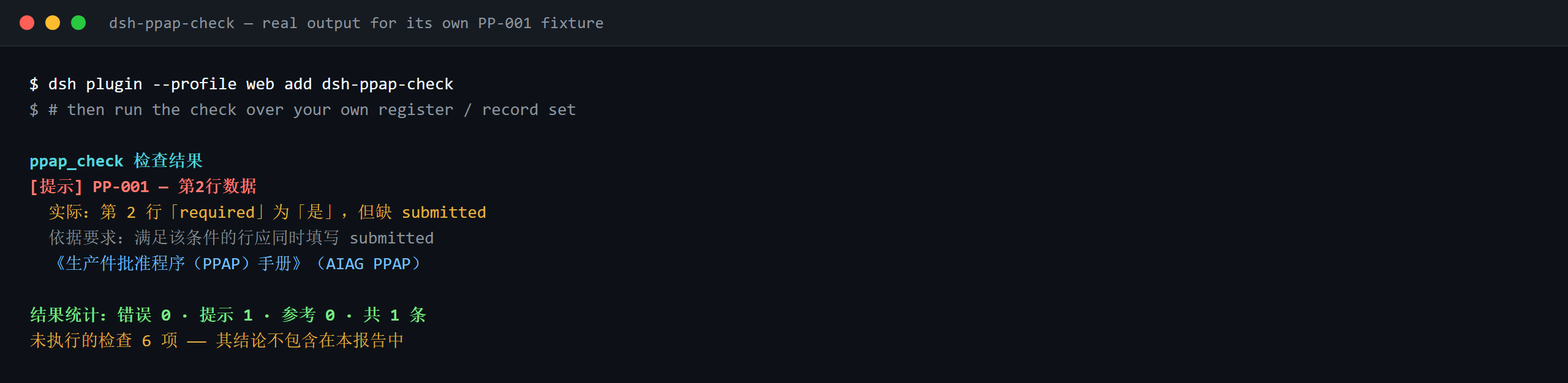
Real output from this plugin over its own `PP-001` test fixture — not a mock-up. The rule pack ships no invented quotations, so a finding names both the clause it applied and the fact that the clause text was not obtained.
## What it answers
| You ask | What it answers |
|---|---|
| An element is marked as required in the 是否要求 column, but there is no submission record for it — is that reported? | Yes. `PP-001` reports the row when the `required` column holds a value that counts as required (`是`, `Y`, `yes`, `true`, `要求`, `√`) while the `submitted` column is empty. It reads that column of your own checklist, never a built-in element list — which elements are required depends on the level the customer specifies — and it does not judge whether the content of what was submitted is acceptable. |
| The row is marked as submitted, but the date cell is empty. And if the date is filled in but falls after the customer's deadline? | `PP-002` reports a row whose `submitted` column holds a value that counts as submitted (`是`, `Y`, `yes`, `true`, `已提交`, `√`) while the `submittedAt` cell is blank. It only checks that the date cell is filled in — whether the date falls inside the deadline set by the customer's project plan is not checked. |
| The control plan row is filled in but its version cell is empty — will that be reported, and what about elements that carry no revision by nature? | `PP-003` looks at element names matching `conditionPattern` — design record, engineering change, DFMEA/PFMEA, control plan, process flow, dimensional results, measurement-system analysis, samples, checking aids, PSW, material reports, preliminary process capability — and reports each matching row whose `version` cell is empty. It only checks that the version is filled in, not that it is the correct or the current revision; narrow the pattern if an element genuinely carries no revision. |
| Every element row looks complete, but the tool says the sheet is missing the part number and the level. Our form records the level on each row instead. | `PP-004` reads the header only: `partNo` and `level` must both be present at the top of the material. If your form keeps the level on the detail rows, change this rule's `fields` or write a check of your own — the rule does not look for those values inside the rows. |
| The level cell reads `Level 3`, but `PP-005` never says anything about it. | `PP-005` ships with an empty `values` list, and empty means unconfigured, so it reports itself in `skipped` instead of passing quietly. Put your customer's level spellings into `values` and it will report any value that is not on the list. Even then it only checks that the value is on your list — whether the level chosen is the right one is the customer's decision — which is why the rule is capped at `info`. |
| Our checklist was copied from last year's template: one element name still reads 【待填】 and two rows carry the same element number. | `PP-006` reports an element name that still contains a placeholder — `【`, `】`, `{{`, `}}`, `XXX`, `xxx`, `待填`, `待补充`, `TBD`, `todo`, a `terms` list you can adjust to your own template. `PP-007` reports a repeated element number in `elementNo`, comparing with whitespace ignored; a hit usually means the element was registered twice or the number was copied wrong, and which of the two it is has to be confirmed by a person. |
## Standards it follows
| Document | Number | Cited by rules |
|---|---|---|
| 《生产件批准程序(PPAP)手册》 | AIAG PPAP(现行版次与条号本次未核实) | PP-001, PP-002, PP-003, PP-004, PP-005, PP-006, PP-007 |
**Boundary:** this plugin checks a **PPAP 提交要素清单** for what a checklist can be held to mechanically —
that an element the customer required carries a submission record, that a submitted element carries a date,
that a controlled element (design record, FMEA, control plan, process flow, dimensional results, MSA) carries
a revision, that the sheet names its part number and submission level, that element numbers are unique, and
that no template placeholder survives. It does **not** decide whether PPAP may be approved, whether the level
is right, or whether an element's content satisfies the customer. **The submission level is the customer's to
set, and this plugin ships no level-to-element mapping.**
> ### ⚠️ Read this before trusting a citation in the report
>
> **Every `excerpt` in this plugin's rule pack says, in so many words, that the clause text was not
> obtained.** The method lives in the automotive **AIAG《生产件批准程序(PPAP)手册》** (and the customer
> specific requirements under IATF 16949). The verification pass could not retrieve verbatim clause text, so
> rather than paraphrase a quotation the pack states the gap in the `excerpt` field itself and puts the
> honest reasoning in `note`. Every rule is therefore `warn` or `info`, and a test asserts that no rule
> claims a quotation it does not have. **When the text is in hand, two things must be done: replace each
> `excerpt` with the real clause, and raise `kind` to `direct`.**
>
> **Which elements must be submitted depends on the level the customer specifies** (Level 1–5), so `PP-001`
> reads the **checklist's own 是否要求 column** rather than any built-in list, and `PP-005`'s level vocabulary
> ships **empty** — with no vocabulary configured it reports itself in `skipped` instead of passing quietly.
## Compatibility
| Surface | Status |
|---|---|
| Harness | Peer range `>=0.1.2-rc.1 <0.2.0 \|\| >=0.2.0-0 <0.3.0` — verified to accept both `0.2.0-rc.2` and `0.2.1-alpha.1`. `engines.dsh` is deliberately not declared: it has no reader and cannot reject a host |
| Node | `^22.19.0 || >=24.0.0` |
| Platforms | All (plain ESM; no native code, no network, no model call) |
| Tool mode | Works in `native`, `ptc` and `both`; for several parts use `ptc` |
## What it does
Registers the `ppap_check` tool. It reads one submission-element checklist — the part header plus one row per
element — applies a versioned rule pack, and returns a report.
| Rule | Check | Severity | Basis kind |
|---|---|---|---|
| `PP-001` | a required element has a submission record | warn | principle |
| `PP-002` | a submitted element carries a date | warn | principle |
| `PP-003` | a controlled element carries a revision | warn | principle |
| `PP-004` | the sheet names its part number and level | warn | principle |
| `PP-005` | the level comes from your customer's vocabulary (off by default) | info | local |
| `PP-006` | the element column holds no unreplaced placeholder | warn | principle |
| `PP-007` | element numbers are unique | warn | principle |
## Install
```sh
dsh plugin --profile <name> add dsh-ppap-check
dsh --profile <name> --dump-config | grep 'dsh-ppap-check'
```
## Configuration
| Key | Type | Default | Description |
|---|---|---|---|
| `rulesFile` | string | `rules/ppap-check.yaml` | Rule-pack path, relative to the package root |
| `disabledRules` | string[] | `[]` | Rule ids to stop running; each appears in `skipped` |
| `onlyRules` | string[] | `[]` | Run only these rule ids; empty runs every rule |
| `skipNotes` | string | `""` | Note appended to every `skipped` reason |
| `timeoutMs` | number | `120000` | Cooperative tool timeout budget |
Rule-level parameters worth knowing:
- `PP-001` `conditionValues` — the values in your 是否要求 column that mean "required", by default
`[是, Y, yes, true, 要求, √]`.
- `PP-002` `conditionValues` — the values in your 是否提交 column that mean "submitted".
- `PP-003` `conditionPattern` — the element names that carry revisions; the default covers design records,
engineering changes, DFMEA/PFMEA, control plans, process flows, dimensional results, MSA, samples,
checking aids, PSW, material reports and preliminary capability studies.
- `PP-005` `values` — your customer's level spellings, e.g.
`[Level 1, Level 2, Level 3, Level 4, Level 5]`. Empty means no check.
## Material format
The tool accepts JSON or YAML:
```yaml
partNo: P-2026-001
partName: 前支架
supplier: 某某零部件有限公司
level: Level 3
rows:
- { 序号: '1', 提交要素: 设计记录, 是否要求: 是, 是否提交: 是,
提交日期: 2026-03-05, 版本: B, 责任人: 张工 }
```
Column names are matched case-insensitively and ignoring spaces, underscores and hyphens; the sheet's own
column names are kept, so a finding names the column it read.
## Rule sources
Rule data lives in `rules/ppap-check.yaml`. The pack's header states the citation gap in full, and each
rule's `note` repeats the part that matters for that rule. The load-time guard that normally enforces "an
excerpt must be a real quotation of at least eight characters" cannot tell a quotation from a description —
so this pack leans on the header, the per-rule notes and a test that asserts every `excerpt` admits the gap.
## Troubleshooting
- **`PP-005` never runs.** Its vocabulary is empty. Level spellings differ between customers, so the plugin
will not guess them.
- **`PP-001` fires on an element I do not intend to submit.** The 是否要求 column says it is required. If the
element is not required at your customer's level, correct that column rather than deleting the row.
- **`PP-003` fires on an element with no revision.** The element's name matches the pattern but the version
column is empty. Narrow `conditionPattern` if your checklist has an element that genuinely carries no
revision.
- **The plugin installs but the tool never appears.** Check that `main` resolves to `lib/index.mjs` and
that `pnpm run build` produced it; a wrong `main` makes the loader skip the entry silently.
- **`dsh plugin add` refuses the package as incompatible.** The peer range covers `0.1.x` and `0.2.x`; if
your runtime sits outside it, grant an explicit exemption:
`dsh plugin --profile <name> allow-version dsh-ppap-check@0.1.0 --dsh-version <runtime> --accept-risk`
- **`check` reports `manifest-peers` as failed.** The static checker compares against a hard-coded peer
range that predates the 0.2 line. The runtime enforces peer compatibility at install time, so the
declared range is the correct one; this is a known upstream issue in `dsh-plugin-dev`.
## Development
```sh
pnpm install
pnpm run typecheck # tsc --noEmit
pnpm test # vitest, the shared table-plugin suite plus paired fixtures
pnpm run build # tsdown -> lib/index.mjs + lib/index.d.mts
node ../scripts/sync-shared.mjs dsh-ppap-check # refresh src/shared from ../_shared
```
The plugin is **data-only**: `src/model.ts` declares the table shape, the shared kit supplies the reader and
the check engine, and the rule pack declares every check.
## License
[Apache License 2.0](LICENSE) © 2026 dsh-ppap-check contributors.
Install
dsh plugin --profile web add github:PerryLink/dsh-ppap-check
Profile: web
With the hub plugin installed, ask your agent to install it by name — it resolves the same plan shown here.
dsh plugin --profile web add github:stvlynn/dsh.fish#path:packages/dsh-plugin-hub
install dsh-ppap-check from the hub
- This package builds from source on install. pnpm will ask you to allow its build script — that is permission to run the package’s code on your machine, outside the agent sandbox. Only allow sources you trust.
- This source has no pinned commit, so a later push upstream changes what installs. Prefer pinning a commit.