Bundle
dsh-ops
Native file and PTC tools for DSH on Windows x64, Linux x64 and macOS Apple Silicon; Windows-only optional Bash payload and host PowerShell integration
- Source
- T-Auto
- weekly downloads
- 17k weekly downloads
- License
- MIT AND Apache-2.0
- Updated
- Updated 2 days ago
Readme
<p align="center">
<img src="docs/assets/readme/dsh-ops-header.svg" alt="dsh-ops 表头" width="640">
</p>
<p align="center">
<strong>中文</strong> | <a href="README.en.md">English</a>
</p>
<div align="center" style="text-align: center;">
<a href="https://trendshift.io/repositories/296103" title="Trendshift · JavaScript 日榜">
<img src="https://trendshift.io/api/badge/trendshift/repositories/296103/daily?language=JavaScript" alt="Trendshift · JavaScript 日榜" width="250" height="55" style="vertical-align: middle;">
</a>
</div>
<p align="center">
<a href="https://www.npmjs.com/package/dsh-ops"><img alt="npm" src="https://img.shields.io/npm/v/dsh-ops?style=flat-square&color=6c5ce7"></a>
<a href="https://www.npmjs.com/package/dsh-ops"><img alt="npm downloads" src="https://img.shields.io/npm/dm/dsh-ops?style=flat-square&color=4b6fff"></a>
<a href="https://github.com/T-Auto/dsh-ops/stargazers"><img alt="GitHub stars" src="https://img.shields.io/github/stars/T-Auto/dsh-ops?style=flat-square&color=eab308"></a>
<a href="https://upstar.dev/r/T-Auto/dsh-ops"><img alt="Upstar: #2 in JavaScript" src="https://upstar.dev/badge/T-Auto/dsh-ops.svg"></a>
</p>
# dsh-ops
OPS 为 DSH 增加有界文件与文档工具。Native 模式返回紧凑、带行号的文本;PTC 代码从同一个按调用启动的 Rust worker 获取类型化 Outcome。宿主集成使用严格 TypeScript,编译后保持已有 JavaScript 包路径。
> [!IMPORTANT]
> 本分支是 **0.4.0 发布候选**,尚未发布。已批准的验收范围为:BM-01 相比 OPS 0.3.x 输出减少至少 40%,官方读取另列对照;BM-03 对文件/发现 schema 执行 400 token 上限,同时保留 Bash 启动常驻并单列完整总数。最终实测证据与功能 CI 缺一不可。
> 详情见[发布状态与限制](docs/0.4.0发布候选.md)。下方 `@latest` 命令安装已发布版本;评估候选版本需自行构建本检出目录并打包。
- Native 默认提供 `ops_read_files` 与 `ops_discover_tools`;三个平台的默认 profile 都启用 shell 行并提供 `ops_bash`。高级工具在所属 agent 的下一次供应商请求中激活。
- PTC SDK 目录包含 18 个 API:15 个文件/文档工具,加批处理、结果引用和加载器。仅暴露配置为常驻或已选择的 API;Native 与 PTC 分别提供自己的输出形式。
- 可按需发现有界 CSV/TSV、DOCX 主体段落与受限 PDF 文本层读取。尚不支持二进制 DOC、OCR、通用 PDF 渲染、网页搜索或 HTML 抓取;使用前请查看[文档格式限制](docs/原生内核.md)。
- 七个组件独立启停,保留已有 profile ID 与配置。逐工具官方替换默认关闭。[设置](docs/配置参考.md)提供严格校验的内置表单;可选浏览器页面需显式执行离线承载行迁移。
- shell 组件在三个平台默认开启:Windows 使用主包声明的固定 bash 载荷——`optionalDependencies` 中的 `@dsh-ops/bash-win32-x64@0.2.1`,npm 安装时自动拉取 ops 自带的独立 **bash 5.3.15**(PortableGit `v2.56.0.windows.2`),也可用 `bashPath` 把 `ops_bash` 指向 git bash;Linux/macOS 使用发行版自带 bash,可用 `config.bashPath` 覆盖。`dsh-ops bash-runtime install` 保留为安装/修复与选择受管理副本的路径。PowerShell 仍由宿主管理;升级命令先预览标准安装,仅加 `--yes` 才执行。
OPS 只发布自身作用域内的工具与可选路由提示,不改写共享工具注册表。每次调用均检查权限与取消状态。Windows 受限 Bash 仍存在文档注明的部分约束与运行时兼容性限制。
历史 token 节省说法不能证明本候选版本通过发布门禁。ops 指广义 operations(运行操作),并非运维/SRE 产品。
## 安装、更新、卸载
### 官方插件市场
在目标 DSH 应用的插件市场中输入 npm 包名 **`dsh-ops`**,选择自定义地址,输入 `https://mirrors.huaweicloud.com/repository/npm/`,安装后选择启用。目前不推荐用npmmirror安装,有bug。
当然,如果你确定可以连接 npm 官方源那就选择官方源,如果你不确定那就按教程操作。

### npm 一键安装
#### 安装方法
```console
npx --yes dsh-ops@latest install --profile desktop
npx --yes dsh-ops@latest install --profile web
npx --yes dsh-ops@latest install --profile tui
```
必须显式选择目标 profile;`tui` 映射到 **dsh-TUI 产品的 `dsh-tui` profile**,不是旧的 `tui` 目录。请先初始化目标应用。该入口委托官方 DSH CLI 安装,不另写一套 profile 锁与回滚逻辑。
桌面端必须使用桌面应用自带的 CLI;默认探测 `%LOCALAPPDATA%\Programs\DeepSeek Harness\resources\runtime\cli\bin\dsh.cmd`。安装在其它位置时加 `--dsh-cli "<安装目录>\resources\runtime\cli\bin\dsh.cmd"`。Web/TUI 需要可用的 DSH CLI,可同样显式指定。
安装或卸载时可加 `--dry-run` 预演。它按指定路径或 `PATH`(Windows 同时使用 `PATHEXT`)解析 CLI,检查文件、POSIX 执行权限及通过 Node 启动的入口文件,并在预演时同样拒绝不安全的 Windows 命令脚本路径;检查失败返回非零。预演只打印计划,不启动 CLI、不修改 profile。成功表示这些静态检查已通过,不保证所选程序的身份、版本、profile 兼容性或后续安装结果。
也可以直接使用官方命令:
```console
dsh plugin --profile web add dsh-ops
dsh plugin --profile dsh-tui add dsh-ops
"<桌面安装目录>\resources\runtime\cli\bin\dsh.cmd" plugin --profile desktop add dsh-ops
```
普通 DSH CLI 不能管理保留的 `desktop` profile;不要把它与桌面自带入口混淆。
#### 更新方法
重新运行相同的 `npx --yes dsh-ops@latest install --profile ...`,或用官方 CLI `add dsh-ops@latest`。按应用提示重载;替换已加载代码时重启应用。
#### 卸载与查看状态
```console
npx --yes dsh-ops@latest status --profile desktop
npx --yes dsh-ops@latest uninstall --profile desktop
```
把 `desktop` 换成 `web` 或 `tui` 即可。也可在市场卸载,或执行官方 `dsh plugin --profile ... remove dsh-ops`。插件依赖(含 Windows bash 可选载荷)随 profile 管理;单独 provision 的 Bash 用 `dsh-ops bash-runtime remove --yes` 移除,不误删系统 shell、其它 profile 的副本或包管理器共享缓存。
旧版显式 provision 的 `<DSH_HOME>/dsh-ops/` 文件(provision 的 shell,以及早期版本可 provision 的 FastCtx 运行时)需单独清理:`npx --yes dsh-ops@latest uninstall --yes`。已移除的后台组件留下的 `~/.fastctx/` 状态默认不删;需要时显式加 `--purge-fastctx`。
原 `dsh-ops/background` 组件(FastCtx 后台任务)已移除。仍保留该行的 profile 照常加载:该行不发布任何工具,只记录一条警告,可直接删除。
## 可选 OPS 只读侧栏
在 dsh-TUI 中启用 `dsh-ops/tui` 行并重启,即可添加 OPS 侧栏;不抢焦点,不执行额外工具调用。没有 `tuiPanels` 的宿主仅让该可选行等待,不影响其它组件。见 [侧栏说明](docs/tui-panel.zh.md)。 聚焦后可用 `f` 筛选、`n`/`p` 本地翻页、`a` 确认跨会话提醒;只浏览有界保留元数据,不拉取结果分页。
## 文档
- [使用指南](docs/使用指南.md) · [常见问题](docs/常见问题.md) · [组件参考](docs/组件参考.md) · [配置参考](docs/配置参考.md)
- [PTC 设计与使用](docs/native-ptc.md) · [手动验证](docs/手动验收.md)
- [贡献指南](docs/贡献指南.md) · [路线图](docs/路线图.md) · [变更日志](docs/CHANGELOG.md) · [溯源记录](docs/PROVENANCE.md)
## 许可证
插件源码分发采用 **`MIT AND Apache-2.0`**:`licenses/fastctx/` 之外为 MIT;FastCtx 为 Apache-2.0。见 [NOTICE](NOTICE)、`licenses/fastctx/LICENSE-APACHE` 与 `licenses/fastctx/NOTICE`。
独立的 Windows bash 载荷包(npm 可选依赖 `@dsh-ops/bash-win32-x64`)另按上游组件许可证分发:Git for Windows 包含 GPL-2.0 等许可组件,其原始许可证、声明及来源记录随载荷保留;PowerShell 由宿主管理,按其 MIT 与第三方组件许可分发。插件的 MIT 许可不替代这些许可。详见 [PROVENANCE.md](docs/PROVENANCE.md)。
## 致谢
Rust 工具基于 [yc-duan](https://github.com/yc-duan) 的 Codex 插件 FastCtx 并使用其源代码。vendor 标识与删除型分发改动曾记在 `vendor/fastctx/FORK.md` 和 `vendor/fastctx/UPSTREAM.md`,它们保留在仓库历史和早期发布版本中;vendored 源码本身已随后台组件一并移除。需要转载的 FastCtx 声明如下:
> This product includes FastCtx
> (https://github.com/yc-duan/fastctx), Copyright (c) 2026 yc-duan,
> used under the Apache License 2.0.
>
> FastCtx is redistributed and/or modified here by the maintainer of
> this distribution. Any such change is that maintainer's own work
> and their sole responsibility. It is not endorsed by, not
> supported by, and not attributable to the author of FastCtx, who
> accepts no liability of any kind arising from this distribution or
> from anything built on top of it.
## 维护团队
<table>
<tbody>
<tr>
<td align="center" width="150"><a href="https://github.com/T-Auto"><img src="https://github.com/T-Auto.png?size=160" width="96" height="96" alt="T-Auto"></a><br><a href="https://github.com/T-Auto"><b>T-Auto</b></a></td>
<td align="center" width="150"><a href="https://github.com/ccch1mneyyy"><img src="https://github.com/ccch1mneyyy.png?size=160" width="96" height="96" alt="ccch1mneyyy"></a><br><a href="https://github.com/ccch1mneyyy"><b>ccch1mneyyy</b></a></td>
<td align="center" width="150"><a href="https://github.com/Haoming9527"><img src="https://github.com/Haoming9527.png?size=160" width="96" height="96" alt="Haoming9527"></a><br><a href="https://github.com/Haoming9527"><b>Haoming9527</b></a></td>
<td align="center" width="150"><a href="https://github.com/Thatgfsj"><img src="https://github.com/Thatgfsj.png?size=160" width="96" height="96" alt="Thatgfsj"></a><br><a href="https://github.com/Thatgfsj"><b>Thatgfsj</b></a></td>
</tr>
</tbody>
</table>
※ 排名不分先后
---
## 贡献者
[](https://github.com/T-Auto/dsh-ops)
## Star 趋势
[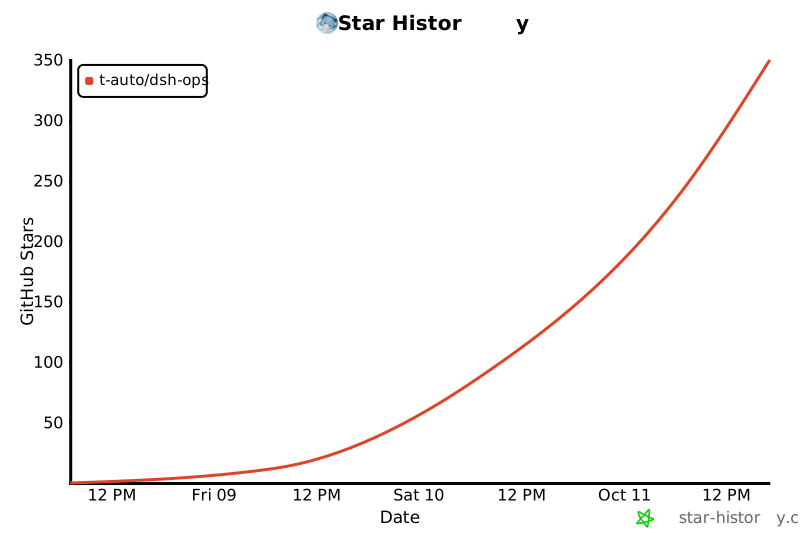](https://star-history.com/#T-Auto/dsh-ops&Date)
Install
dsh plugin --profile web add dsh-ops@0.4.1
Profile: web
With the hub plugin installed, ask your agent to install it by name — it resolves the same plan shown here.
dsh plugin --profile web add github:stvlynn/dsh.fish#path:packages/dsh-plugin-hub
install dsh-ops from the hub