Bundle
dsh-grok-acp
Use Grok Build as an ACP-powered root agent inside DeepSeek Harness Web
- Source
- zmh2000829
- stars
- 5 stars
- License
- MIT
- Updated
- Updated 7 days ago
Readme
# DSH Agent Bridge
<div align="center">
<strong>在 DeepSeek Harness Web 中直接使用 Grok Build,而不是打开另一套 TUI</strong><br /><br />
<img alt="DSH 0.1.1-rc.2" src="https://img.shields.io/badge/DSH-0.1.1--rc.2-4d6bfe" />
<img alt="ACP 0.25.1" src="https://img.shields.io/badge/ACP-0.25.1-6f42c1" />
<img alt="Node.js 22.19 or 24+" src="https://img.shields.io/badge/Node.js-%5E22.19_%7C%7C_%3E%3D24-339933" />
<a href="./LICENSE"><img alt="MIT License" src="https://img.shields.io/badge/License-MIT-yellow.svg" /></a>
</div>
<div align="center">
🌏 <b>中文</b> · <a href="./README_EN.md">English</a>
</div>
<div align="center">
<img alt="在 DSH 首页切换 DSH 与 Grok Build" src="https://raw.githubusercontent.com/zmh2000829/DSH-agent-bridge/main/docs/assets/harness.gif" />
</div>
`dsh-grok-acp` 是 DSH Agent Bridge 的适配器。它通过 Agent Client Protocol(ACP)把 Grok Build 作为根 Agent 接入 DSH Web,并保留 DSH 原有的会话、输入框、工具展示、权限确认和 Markdown diff 界面。
> 当前只实现 Grok Build。项目名选择 **DSH Agent Bridge**,是为了后续可以增加 Codex、Claude Code 等适配器,而不把仓库限制在某个厂商或单一协议上。
## 功能
- 在同一个 `dsh web` 页面选择 **DSH** 或 **Grok Build**。
- DSH 模式动态读取当前部署提供的 Agent 预设,并保留现有模型和插件。
- Grok Build 模式只展示 ACP 实际报告的模型和推理力度,并隐藏无关的 DSH Agent 预设。
- ACP 流式输出映射为 DSH 的回答、思考、工具调用和 diff;计划更新进入输入框上方可折叠的原生任务面板,不再反复写入回答正文。
- 每轮 Grok 工具调用收拢为一行醒目的活动摘要,点击后展开完整时间线;失败时自动展开。文件修改、Markdown diff 和权限请求继续独立展示。
- Grok 权限请求进入 DSH 的批准界面。
- DSH 的 `Full access` 会同步到 Grok ACP 文件访问和批准策略;选择该模式后可读取工作区外的 Grok 内置技能等本机文件。
- 支持 `/usage`、`/context`、`/session-info`、`/btw`、`/model`、`/models`、`/effort` 等 Grok 命令;兼容 `/uasge` 拼写。`/model` 与 `/models` 只展示当前 Harness 的模型。
- 空白会话可切换 Harness;首轮消息发出后锁定,避免一段历史由两个 Agent 引擎共同生成。
- 多个 Grok 会话复用一个按需启动的 ACP 进程,空闲后自动关闭。
- ACP 进程异常退出后,下一次请求会自动重启进程并恢复对应的 Grok 会话。
- 作为独立 DSH Bundle 安装,不修改全局 npm 包或 DeepSeek Harness 源码。
| DSH | Grok Build |
|---|---|
| 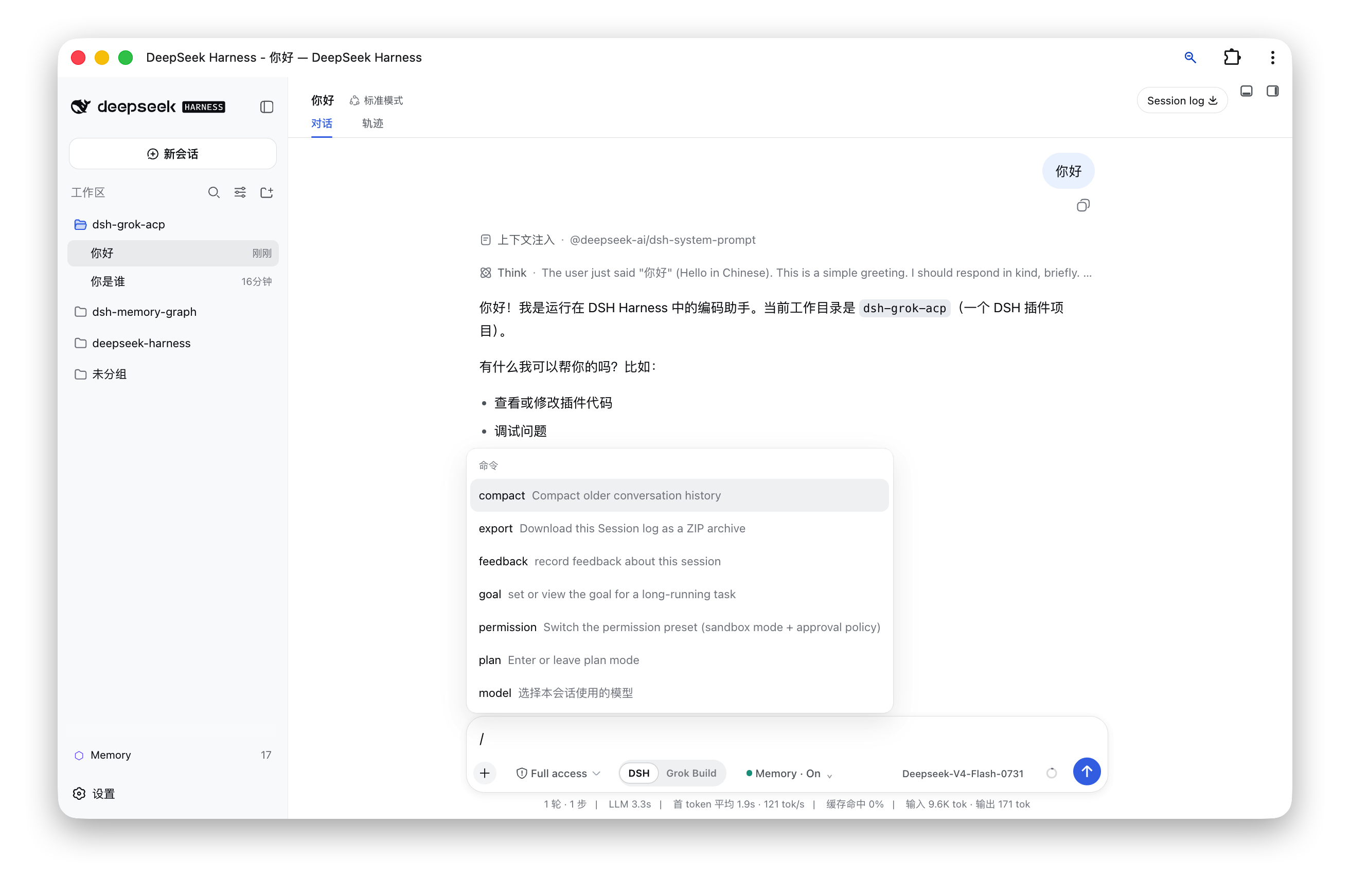 | 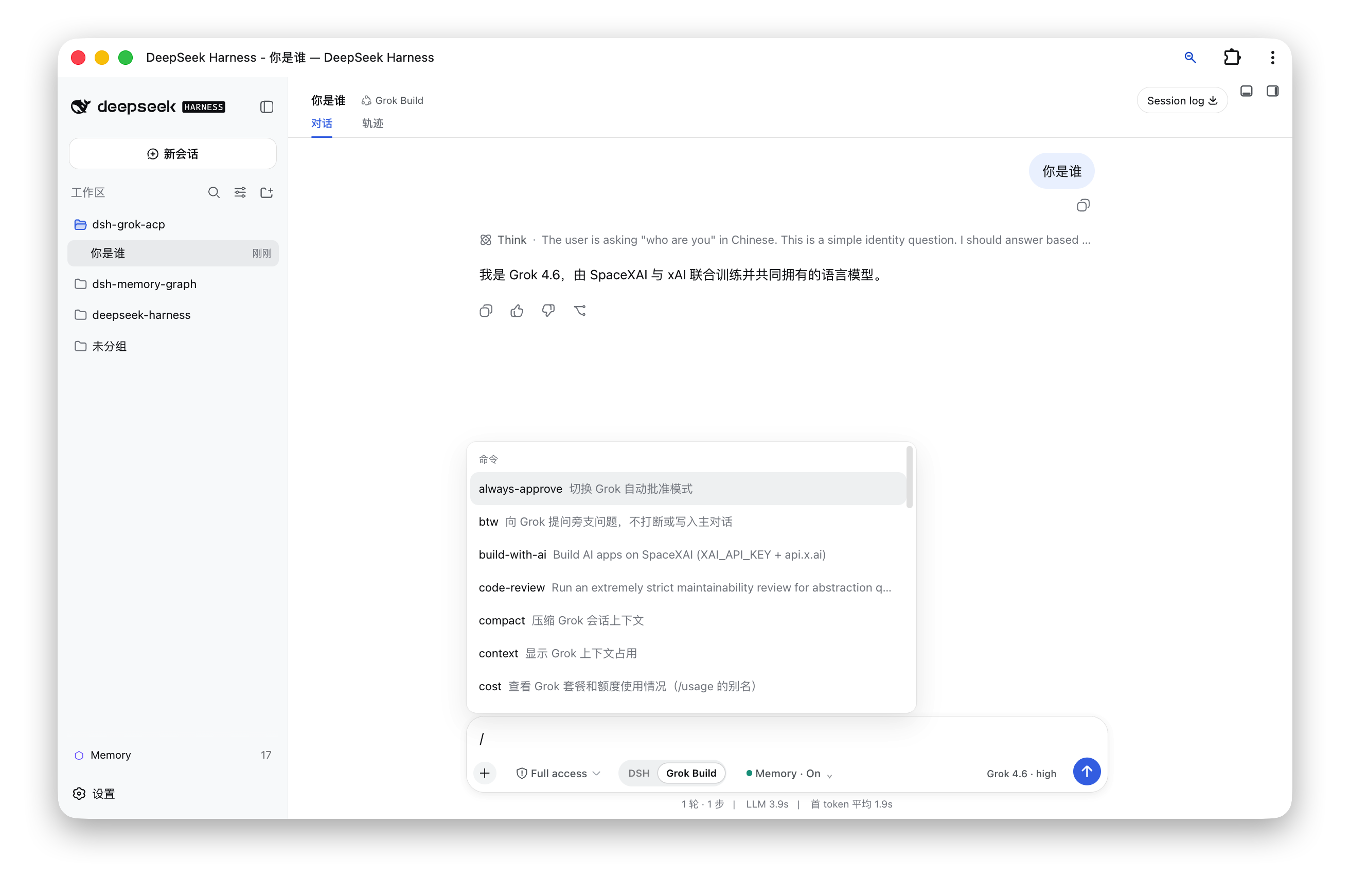 |
## 工作方式
```text
DSH Web composer
│
├── DSH ───────────► 官方 AgentLoop、模型、工具与插件
│
└── Grok Build ────► dsh-grok-acp ── ACP/stdio ──► grok agent
│
└── DSH session log / tool UI / approval UI
```
插件在空白会话切换 Agent preset,并用路由 AgentFactory 选择官方 DSH AgentLoop 或 Grok ACP Agent。模型可见内容仍写入 DSH session log,因此聊天回放、标题、工具结果和 diff 继续使用 DSH Web 的原生展示。
## 安装
### 前置条件
- macOS 或能够运行 Grok Build CLI 的环境。
- Node.js `^22.19` 或 `>=24`。
- 全局安装的 DeepSeek Harness `0.1.1-rc.2`,且 `dsh web` 能正常启动。
- 已安装并登录 Grok Build CLI;`grok --version` 可以成功执行。
### 方式一:从 npm 安装(推荐)
直接运行:
```sh
dsh plugin --profile web add dsh-grok-acp@latest
dsh web
```
打开 [http://127.0.0.1:3080](http://127.0.0.1:3080),新建会话即可看到 Harness 开关。若浏览器仍缓存旧前端,请使用 `Cmd/Ctrl + Shift + R` 硬刷新。
### 方式二:从克隆的项目目录安装
想使用 GitHub 上的最新代码时,可以先克隆并构建项目,再把项目目录直接交给 DSH:
```sh
git clone https://github.com/zmh2000829/DSH-agent-bridge.git
cd DSH-agent-bridge
npm install --legacy-peer-deps
npm run check
dsh plugin --profile web add "$(pwd)"
dsh web
```
其中 `$(pwd)` 表示当前克隆项目的完整路径。如果项目已经在本机,也可以直接填写它的完整路径,例如:
```sh
dsh plugin --profile web add /Users/your-name/Projects/DSH-agent-bridge
```
两种安装方式任选一种,不需要重复执行。Grok preset 直接来自插件包,不会复制或覆盖 `~/.dsh/harness-presets`。
### 检查安装
```sh
dsh plugin --profile web exec dsh-grok doctor
```
应显示 DSH、Grok、Bundle、preset 和客户端构建均已就绪。
## 使用
1. 启动 `dsh web` 并打开 3080 页面。
2. 点击“新会话”。
3. 在输入框下方选择 **DSH** 或 **Grok Build**。
4. 选择 DSH 时,可在输入框上方选择四种 Agent 预设;选择 Grok Build 时,可在输入框右侧选择 Grok 模型和推理力度。
5. 发出第一条消息后,本会话的 Harness 被锁定。要更换 Harness,请新建会话。
Grok Build 会话支持 Grok 返回的命令目录,并额外投影以下常用命令:
| 命令 | 用途 |
|---|---|
| `/usage`、`/cost`、`/uasge` | 查看套餐和用量 |
| `/context` | 查看上下文使用情况 |
| `/session-info` | 查看 Grok 会话信息 |
| `/btw <问题>` | 在不中断主任务的情况下提问 |
| `/model`、`/models` | 选择当前 Harness 的模型;Grok 模式不显示 DSH 模型 |
| `/model <模型>` | 切换 Grok 模型 |
| `/effort <级别>` | 切换推理力度 |
| `/compact`、`/goal`、`/workflow`、`/deep-research` | 交给 Grok Build 执行对应能力 |
## 配置
Bundle 默认启动 `grok agent --no-leader stdio`。常用环境变量:
| 变量 | 作用 |
|---|---|
| `GROK_COMMAND` | Grok 可执行文件;默认优先 `~/.grok/bin/grok`,否则使用 `PATH` 中的 `grok` |
| `DSH_HOME` | DSH home;默认 `~/.dsh` |
| `XAI_API_KEY` | 可选,传给 Grok 子进程 |
高级配置可在 Web profile 的 `cordis.patch.yml` 中覆盖插件行:`command`、`args`、`env`、`stateFile`、`disposeGraceMs`、`idleDisposeMs`、`yoloMode`、`allowOutsideWorkspace`。默认需要逐次批准敏感操作,ACP 文件接口也只能访问会话工作目录;只有在明确接受风险时,才同时开启 `yoloMode` 和 `allowOutsideWorkspace`。
## ACP 覆盖范围
- 初始化与认证:`initialize`、`authenticate`。
- 会话:`session/new`、`session/resume`、`session/load`、`session/close`。
- 执行:`session/prompt`、`session/cancel`、`session/set_config_option`。
- 流事件:assistant、thought、tool call、tool result、plan、commands、model。
- 客户端能力:权限请求、`fs/read_text_file`、`fs/write_text_file`。
- Grok 扩展:billing、BTW、session info、models。
## 更新与卸载
更新 npm 安装:
```sh
dsh plugin --profile web add dsh-grok-acp@latest
```
更新源码安装:
```sh
git pull
npm install --legacy-peer-deps
npm run check
dsh plugin --profile web add "$(pwd)"
```
卸载时运行:
```sh
dsh plugin --profile web remove dsh-grok-acp
dsh web
```
不要手工编辑 `~/.dsh/profiles/web/package.json`。卸载插件不会删除 Grok 自己的登录信息或会话文件。
## 开发与发布
```sh
npm install --legacy-peer-deps
npm test
npm run build
npm pack --dry-run
```
- `lib/*.js` 是 Node 端插件与发布入口。
- `src/client/index.tsx` 是 Web 客户端源码;`npm run build` 生成 `lib/client.js`。
- `presets/grok-build` 是包内 Agent preset。
- `.github/workflows/ci.yml` 在 Node 24 上执行测试、构建和发布清单检查。
项目主页、问题反馈和源码均位于 [zmh2000829/DSH-agent-bridge](https://github.com/zmh2000829/DSH-agent-bridge)。
## 安全与限制
- 浏览器桥接路由只接受 loopback Host,并拒绝跨站请求;写操作要求同源 JSON 请求。
- 文件读写由 ACP 请求发起,默认限制在当前会话工作目录,并拒绝通过绝对路径、`..` 或符号链接越界。`yoloMode` 与 `allowOutsideWorkspace` 都是显式的高权限选项。
- 插件当前针对 DSH `0.1.1-rc.2` 开发。DSH 预发布版本可能改变内部 AgentFactory 或客户端 Slot API;升级 DSH 后先运行测试和真实空白会话验证。
- Grok Build TUI 中依赖终端布局的界面不能原样嵌入 Web;本项目复用的是 Agent 能力和命令,通过 DSH Web 重新渲染。
- 当前没有 Codex 或 Claude Code 适配器;它们应作为独立 adapter 接入,而不是向 Grok 实现中加入条件分支。
## 路线图
- 抽取稳定的 `ExternalAgentAdapter` 接口。
- 增加 Codex adapter。
- 增加 Claude Code adapter。
- 增加 adapter 能力探测、设置页和独立兼容矩阵。
欢迎提交 Issue 和 Pull Request。项目采用 [MIT License](./LICENSE)。
Install
dsh plugin --profile web add github:zmh2000829/DSH-agent-bridge#e7111741a67269503d1f71c379902354687da7f8
Profile: web
With the hub plugin installed, ask your agent to install it by name — it resolves the same plan shown here.
dsh plugin --profile web add github:stvlynn/dsh.fish#path:packages/dsh-plugin-hub
install dsh-grok-acp from the hub
- This package builds from source on install. pnpm will ask you to allow its build script — that is permission to run the package’s code on your machine, outside the agent sandbox. Only allow sources you trust.