Bundle
dsh-git-ai
DeepSeek Harness plugin that records agent edits with git-ai (agent-v1 checkpoints)
- Source
- NiuZhuang
- License
- MIT
- Updated
- Updated 6 days ago
Readme
# dsh-git-ai
English | [中文](README.zh.md)
[GitHub](https://github.com/NiuZhuang/dsh-git-ai) · [npm](https://www.npmjs.com/package/dsh-git-ai) · [Issues](https://github.com/NiuZhuang/dsh-git-ai/issues)
A [DeepSeek Harness](https://github.com/deepseek-ai/deepseek-harness) plugin that records which files the agent edited, with which model, and in which session into [git-ai](https://github.com/git-ai-project/git-ai). It listens on the harness's `tools/pre-execute` / `tools/post-execute` interception points, translates each relevant tool call into git-ai's generic [`agent-v1`](https://usegitai.com/docs/cli/add-your-agent) checkpoint payload, and invokes `git-ai checkpoint <preset> --hook-input stdin` with that JSON on stdin. git-ai itself is never modified; after the agent commits, git-ai writes the attribution into git notes and reports `ai_additions`/`ai_accepted` per tool-model pair.
## Preview
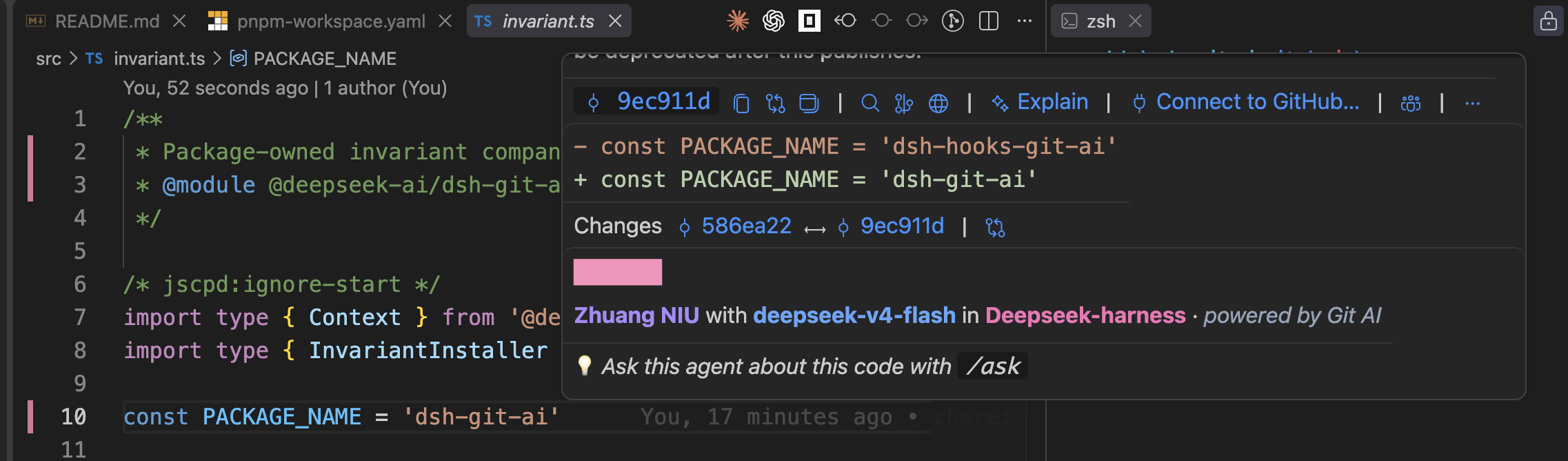
Hover over a line of code in VS Code to see who wrote it, with which model, and in which DeepSeek Harness session it was generated:
## Requirements
- DeepSeek Harness installed via npm (`npx @deepseek-ai/dsh@latest`) — the plugin peer-depends on the official `@deepseek-ai/*` packages it ships with.
- [git-ai](https://github.com/git-ai-project/git-ai) installed and on `PATH` (or point `gitAiPath` at it).
## Install
The package ships as a profile bundle: installing it and activating the patch is one command.
```sh
dsh plugin --profile web add dsh-git-ai
```
> **pnpm ≥ 10 note:** `dsh plugin add` forwards to pnpm, and pnpm 10+ rejects adding to a
> workspace root with `ERR_PNPM_ADDING_TO_ROOT`. dsh profiles are pnpm workspace roots by
> design, so on machines with pnpm ≥ 10 use `-w` (or add `ignore-workspace-root-check: true`
> to `~/.dsh/profiles/<profile>/pnpm-workspace.yaml` once):
>
> ```sh
> dsh plugin --profile web add -w dsh-git-ai
> ```
`dsh plugin` forwards to pnpm inside your profile directory and auto-activates the bundle because the package declares `dsh.bundle`. Without the bundle mechanism (or to load it in a custom profile), add the row to your profile's `cordis.patch.yml`:
```yaml
- dsh-git-ai:
gitAiPath: git-ai
agentName: deepseek-harness
```
## Config
```ts
import type { Config } from 'dsh-git-ai'
const config: Config = {
gitAiPath: 'git-ai', // optional: git-ai executable (bare name resolves through PATH)
agentName: 'deepseek-harness', // optional: `agent_name` stamped on every checkpoint
model: '', // optional: explicit model; empty falls back to agent.options.model
checkpointPreset: 'agent-v1', // optional: the git-ai generic-integration preset
timeoutMs: 10_000, // optional: git-ai invocation timeout
trackBash: true, // optional: emit pre/post shell checkpoints for bash/pwsh
}
```
## Checkpoint mapping
| Harness point | Tool | git-ai payload |
|---|---|---|
| `tools/post-execute` (success) | `write`, `edit` | `ai_agent` with `edited_filepaths` from `file_path` |
| `tools/post-execute` (success) | `str_replace_editor` (not `view`) | `ai_agent` with `edited_filepaths` from `path` |
| `tools/pre-execute` | `bash`, `pwsh` | `pre_shell_command` with `command` and `tool_use_id` |
| `tools/post-execute` | `bash`, `pwsh` | `post_shell_command` with `command` and `tool_use_id` |
Payload identity fields: `repo_working_dir` is the session cwd (falling back to the process cwd), `agent_name` is `config.agentName`, `model` is `config.model` when set else `agent.options.model` (else `''`), and `conversation_id` is the session id. Relative `file_path` / `path` values are resolved against the session cwd into absolute paths; absolute values pass through unchanged. `str_replace_editor` `view` commands are read-only and never attributed.
A failed edit (`result.isError === true`) emits nothing; a failed bash command still emits its `post_shell_command` so the before/after pair closes. Bash tracking keys on the tool `callId`, so pre and post checkpoints share `tool_use_id`.
## Failure containment
git-ai is an optional external dependency. A missing binary, nonzero exit, timeout, or executor rejection is logged as a warning and never propagated: the tool call and the agent turn proceed exactly as if the plugin were absent.
## Verification
```sh
# 1. start the harness with the plugin loaded
dsh web
# 2. have the agent edit files in a git repository
# 3. check git-ai received the checkpoints
git-ai status --json
# 4. commit
git add -A && git commit -m "test"
# 5. check attribution
git-ai stats HEAD --json
```
## Development
```sh
pnpm install
pnpm test # vitest, 100% coverage on src/
pnpm typecheck
pnpm build # emits lib/ for publishing
```
## Publishing
```sh
pnpm build
pnpm publish --access public
```
## Known Limitations and Deferred Work
- **File-edit tools emit only the post-edit `ai_agent` checkpoint.** git-ai attributes a file's changed lines against HEAD or the last checkpointed value, so uncommitted edits made to the same file before the agent's edit (e.g. by the user) are also attributed to the agent. A pre-edit `human` checkpoint before each edit tool would isolate them; the bash pre/post pair already provides this isolation for shell commands.
- **An unmatched `pre_shell_command` is possible.** If a bash tool is denied or canceled between pre and post, the pre snapshot stays open and later changes to the same files are treated as untracked by git-ai until the next checkpoint.
- **Synchronous invocation latency.** Each tracked tool call awaits its git-ai checkpoint (bounded by `timeoutMs`) before the tool result settles.
- **Bash output attribution is snapshot-based.** git-ai infers changed files from file snapshots, so a command that edits files outside the repo tree is not attributed.
## License
MIT
Install
dsh plugin --profile web add github:NiuZhuang/dsh-git-ai
Profile: web
With the hub plugin installed, ask your agent to install it by name — it resolves the same plan shown here.
dsh plugin --profile web add github:stvlynn/dsh.fish#path:packages/dsh-plugin-hub
install dsh-git-ai from the hub
- This package builds from source on install. pnpm will ask you to allow its build script — that is permission to run the package’s code on your machine, outside the agent sandbox. Only allow sources you trust.
- This source has no pinned commit, so a later push upstream changes what installs. Prefer pinning a commit.