Bundle
dsh-compose-panel
DeepSeek Harness plugin: Docker Compose projects, container control and live per-service logs in the native right sidebar.
- Source
- yizhixiaokong
- License
- MIT
- Updated
- Updated 14 hours ago
Readme
# dsh-compose-panel
English | [中文](README.zh.md)
[](https://github.com/deepseek-ai/deepseek-harness)
[](https://github.com/yizhixiaokong/dsh-compose-panel/actions/workflows/ci.yml)
[](LICENSE)
[](https://github.com/topics/dsh-plugin)
A [DeepSeek Harness](https://github.com/deepseek-ai/deepseek-harness) plugin
that puts your Docker Compose projects in the native **right sidebar**: one
group per project directory, live status per container, start/stop/restart on
hover, and a streaming log tab per service.
It is built for the workspace layout that a single-file container viewer gets
wrong: one repository whose subdirectories each own a `compose.yaml`.
```
工作区 ~/work/shop
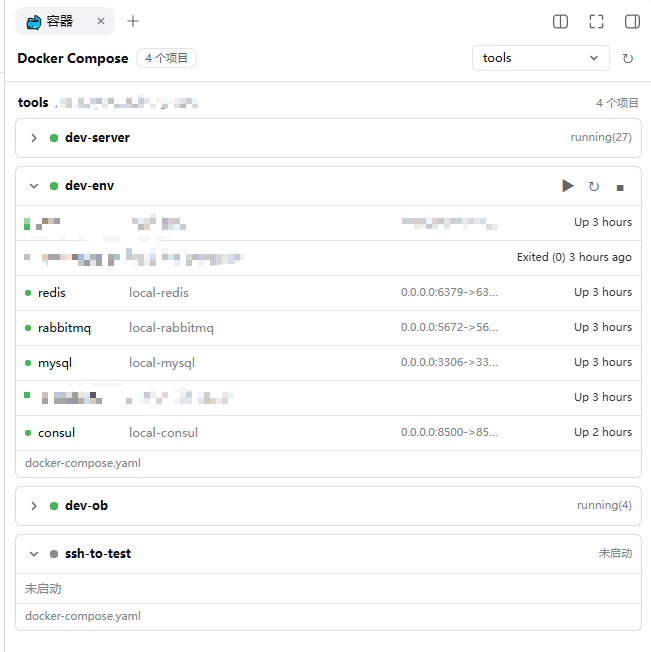
├── compose.yaml → group “shop” 2/2 running
├── services/api/compose.yaml → group “services/api” 1/3 running
└── tools/mail/compose.yaml → group “tools/mail” not started
```
## Screenshots
The panel in the right sidebar: one collapsible group per project directory, the
aggregate container state on the right of each header.
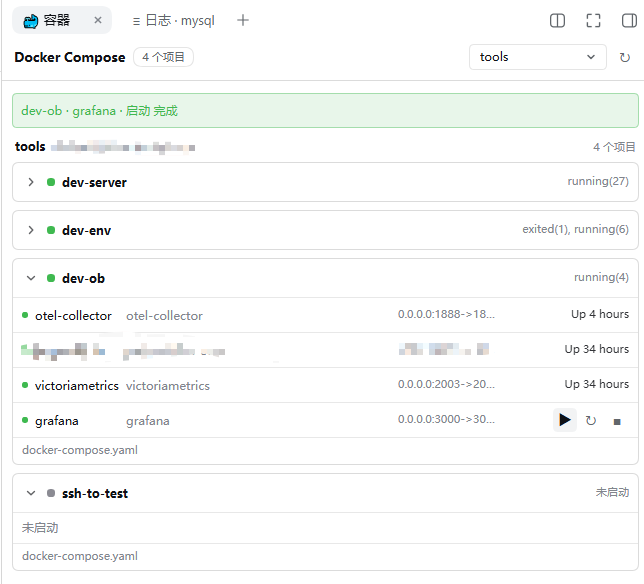
Hovering a row replaces its status cell with that row's actions — project-wide on
a group header, per-service on a container row.
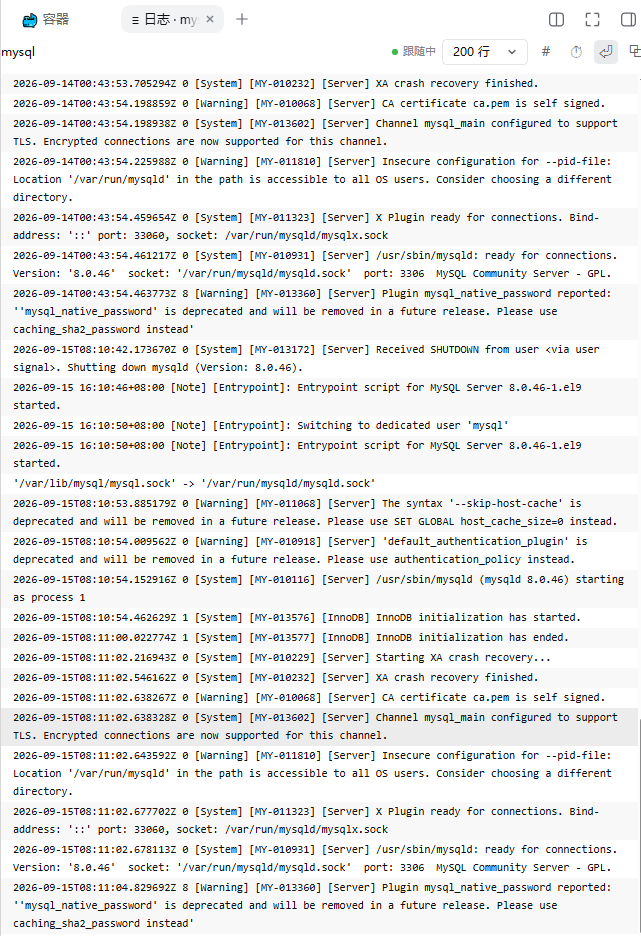
Clicking a container row opens a streamed log tab for that service.
## Features
- **One group per project directory.** Projects are keyed by directory, never
by the compose project name, so `-p`, `COMPOSE_PROJECT_NAME` and `.env` cannot
merge two different stacks into one row.
- **Three discovery sources.** Running and stopped containers, projects Docker
already knows but that hold no container, and compose files never brought up
at all — all three appear, so an untouched `compose.yaml` still shows as a
project that is simply not started.
- **Workspace scoped.** Only projects inside a DSH workspace are listed.
Containers that belong to a workspace-relative directory are grouped under the
longest-matching workspace; everything else is counted, not hidden.
- **Collapsible groups**, status on the right, fixed row heights (nothing moves
when the pointer crosses a row).
- **Hover actions.** Resting on a row swaps its status cell for the actions that
apply to it: project-wide `up -d` / `restart` / `stop`, or the same three for
one service. Nothing is ever run without a click.
- **Live logs, streamed.** Click a service row to open a log tab for that
service; click a project header to open one for the whole project. Each target
keeps its own tab.
- **Silent refresh.** The list re-reads itself every 45s while idle and every 8s
while something is still starting, without losing scroll position, open
groups or the selection.
- Product-native styling: it uses the harness' own theme tokens, so it follows
light and dark mode and the accent colour without a settings screen.
## Requirements
| Requirement | Notes |
| --- | --- |
| DSH with a web profile | The plugin registers a right-sidebar tab type and one HTTP route, both served by `webServer`. |
| Docker CLI on `PATH` for the **host** process | `docker ps` and `docker compose ls` are run as child processes; the compose v2 plugin (`docker compose`, not `docker-compose`) is required. |
| A POSIX host | Paths are handled as POSIX paths; Windows is untested. |
| A DSH workspace | Only directories inside a registered workspace are listed. |
## Install
Straight from GitHub — nothing to clone (pin a tag if you want a fixed release):
```sh
dsh plugin --profile web add "github:yizhixiaokong/dsh-compose-panel"
# pinned: dsh plugin --profile web add "github:yizhixiaokong/dsh-compose-panel#v0.1.1"
```
From a clone, when you want to edit the code:
```sh
git clone https://github.com/yizhixiaokong/dsh-compose-panel.git
cd dsh-compose-panel
dsh plugin --profile web add "$PWD"
```
From npm:
```sh
dsh plugin --profile web add dsh-compose-panel
```
All three end the same way, and none of them needs a manual registration step:
`dsh plugin` runs pnpm, then reads each installed dependency's
`package.json`; a package that declares `dsh.bundle` has its name appended to
`dsh.profile.bundles`, which is what mounts the
[`cordis.patch.yml`](cordis.patch.yml) beside it. (A dependency without that
declaration is installed as a plain library and warns instead.) There is no
build step either — the client half is a hand-written bundle that ships in
`lib/`.
Then restart the harness so the client bundle is picked up:
```sh
dsh web
```
To remove it:
```sh
dsh plugin --profile web remove dsh-compose-panel
```
> The client half is baselined when the host boots. Editing
> `lib/client.js` in a running harness changes nothing until `dsh web`
> restarts — a browser refresh is not enough.
## Usage
1. Open the right sidebar and pick the **🐳 容器** capsule from the guide page.
2. Each workspace is a section; each project directory is a collapsible group
headed by its path, with the aggregate container state on the right.
3. Hover a project header to act on the whole project; hover a container row to
act on that one service. The action buttons replace the status cell while the
pointer is on the row, and the result is reported in a short banner.
4. Click a container row (not a button) to open **logs** for that service in a
new tab. Click the group header to open logs for the whole project.
Log tabs have their own controls: replay size (`tail`), whether to re-open the
stream, timestamps on/off, line wrapping, and — for a whole-project tab — the
service-name column.
## How projects are discovered
One `list` call runs three commands and joins their results by directory:
| Source | Command | Contributes |
| --- | --- | --- |
| Containers | `docker ps -a --format '{{json .}}'` | Every container, grouped by the `com.docker.compose.project.working_dir` label. |
| Known projects | `docker compose ls --all --format json` | Projects that exist but currently have no container (its `ConfigFiles` are absolute). |
| Untouched files | one bounded `find` per workspace | Compose files that were never brought up: depth 4, with `node_modules`, `.git`, `vendor`, `dist`, `build`, `target`, `.venv`, `venv`, `__pycache__`, `.next`, `.cache` and `.tox` pruned. |
A project's directory is the join key. Compose file names recognised by the scan
are `compose.yml`, `compose.yaml`, `docker-compose.yml`, `docker-compose.yaml`
and the `compose.<name>.y*ml` / `docker-compose.<name>.y*ml` variants.
## HTTP API
The host half registers one prefix route, `/compose/api`. Every response uses the
same envelope: `{"ok":true,"value":…}` on success, `{"ok":false,"error":{"code","message"}}`
on failure.
Every call is fenced before any command runs. For the two POST methods the
`Host` header must name a loopback authority (`localhost`, `127.0.0.1`, `::1`,
`*.localhost`, with or without a port) or an authority in the web runtime's
trusted list; a request the browser marks `Sec-Fetch-Site: cross-site` is
refused; and if an `Origin` is present its host must equal `Host`. The log
stream uses the read-side variant: the socket peer must be loopback (or the
`Host` trusted), no forwarding header (`forwarded`, `x-forwarded-for`,
`x-real-ip`) may be present, and a missing `Origin` is accepted — browsers send
none on a same-origin `EventSource`.
### `POST /compose/api/list`
```jsonc
// request — root is optional; without it every workspace is listed
{ "root": "/home/me/work/shop" }
```
```jsonc
// response value
{
"workspaces": [{ "path": "/home/me/work/shop", "title": "shop" }],
"groups": [{
"root": "/home/me/work/shop",
"title": "shop",
"scanError": "",
"projects": [/* … */]
}],
"total": 7, // containers inside the selected workspaces
"outside": 2, // containers found but outside every workspace
"standalone": 1, // containers with no compose project label
"notices": []
}
```
### `POST /compose/api/action`
```jsonc
{
"action": "restart", // "up" | "stop" | "restart" — a closed set
"dir": "/home/me/work/shop", // the project directory, must be in a workspace
"service": "api", // optional; omitted = the whole project
"files": ["/home/me/work/shop/compose.yaml"] // optional compose files (-f)
}
```
```jsonc
// response value; `code` is docker's exit code, `output` its combined output
{ "action": "restart", "dir": "…", "service": "api", "code": 0, "output": "" }
```
There is deliberately no `down`: removing containers and volumes is not a
sidebar-click operation. `service` is matched against
`^[A-Za-z0-9][A-Za-z0-9._-]{0,99}$`, and every `-f` path must lie inside `dir`.
argv is passed to `spawn` directly and never goes through a shell.
### `GET /compose/api/logs` (Server-Sent Events)
| Query | Meaning |
| --- | --- |
| `dir` | Project directory (required, must be in a workspace). |
| `service` | One service; omitted streams the whole project. |
| `tail` | Lines replayed first: default `200`, clamped to `1…5000`. |
| `timestamps` | `1` adds `--timestamps`; off by default. |
| `file` | Compose file (`-f`), repeatable. Without it the host derives the files from `docker compose ls` and, failing that, a shallow `find`. |
Frames are `data:` JSON objects:
```jsonc
{ "open": true, "command": "docker compose -f … logs -f --tail 200 api" }
{ "out": "api-1 | listening on :3000\n" } // stdout chunk, already UTF-8 safe
{ "err": "…" } // stderr chunk, same shape
{ "eof": true, "code": 0 } // docker exited
{ "error": "spawn failed: …" }
```
The stream carries `NO_COLOR=1`, sends a comment ping every 15s so a dead peer
is noticed, stops after 4 MB, and terminates the docker process as soon as the
tab closes, reloads or navigates away — `logs -f` never ends on its own.
## Limits and known behaviour
- **Read-only elsewhere.** Only `up -d`, `stop` and `restart` are reachable;
nothing else in the sidebar mutates state.
- **Label parsing.** `docker ps` returns the compose project labels as a
comma-separated string; compose labels never contain a comma, so splitting on
`,` is safe here.
- **Log prefix.** Docker's own `<service> | ` prefix stays in a project-wide log
tab and is hidden by default in a single-service tab, where it only repeats
the tab title.
- **First paint.** The very first `list` shells out to `find` once per workspace;
on a very large tree the panel can take a moment to fill in. Later refreshes
reuse the last result.
- **No shell plugin.** Container state comes from the Docker CLI, so a stopped
Docker daemon shows up as an error notice rather than an empty panel.
## Development
```
lib/index.js host half — routes, discovery, docker invocations
lib/client.js client bundle — sidebar tab, list, log viewer
cordis.patch.yml the single host row this package contributes
scripts/smoke.mjs offline checks (no Docker, no harness, no network)
```
```sh
npm test # node scripts/smoke.mjs
```
The smoke test materializes the client bundle against stub globals and applies
the host half to a stub context. It pins the two failures that are expensive to
reach live: a factory binding read before its declaration (which throws during
profile boot and unloads every later plugin row) and a changed set of sidebar
seats or routes.
After changing `lib/client.js` or `lib/index.js`, restart `dsh web` — the client
bundle is baselined at boot.
## Repository notes
Versions are tagged to match `package.json` — this tree is `v0.1.1`.
The `yizhixiaokong` placeholder in `package.json`, `CHANGELOG.md`, the badges and the
install commands above stands for the GitHub account this repository is pushed
to; replace it before publishing. The commits here were authored under a neutral
`dsh-plugins <noreply@example.com>` identity so that no personal address ends up
in the published history; if you want your own name on them, set
`git config user.name` / `user.email` and run
`git commit --amend --reset-author` before pushing.
### Getting listed in the marketplace
The plugin list at
[awesome-dsh-plugin](https://github.com/awesome-dsh-plugin/awesome-dsh-plugin)
is generated from one YAML file per plugin, and its CI checks a submission's
shape against this repository. The mechanical part is already satisfied here:
`dsh.bundle` is declared in `package.json` beside `cordis.patch.yml`, the
official `@deepseek-ai/*` packages are declared as `peerDependencies` (this
package imports none of them, but it is a Cordis plugin), there are no
dependencies to install and no build step. What is left belongs to the
repository owner:
1. add the `dsh-plugin` topic —
`gh repo edit yizhixiaokong/dsh-compose-panel --add-topic dsh-plugin`;
2. let the repository age past 1 day (the list's CI rejects younger ones);
3. open one PR adding `data/plugins/yizhixiaokong__dsh-compose-panel.yml`:
```yaml
url: https://github.com/yizhixiaokong/dsh-compose-panel
name: yizhixiaokong/dsh-compose-panel
category: dev
description:
en: 'Lists the Docker Compose projects of your DSH workspaces in the right sidebar, one group per project directory, with container status, project- and service-level up/stop/restart, and streamed per-service logs.'
zh: '在右侧栏列出各 DSH 工作区中的 Docker Compose 项目,按项目目录分组,显示容器状态,支持项目级与服务级 up/stop/restart 以及单服务日志流。'
```
The storefront reads a `screenshots.json` next to `package.json` (1–8 images)
for its screenshot strip; this repository declares `assets/01-projects.png`,
`assets/02-actions.png` and `assets/03-logs.png`, in that order.
### Publishing to npm
```sh
npm login --registry=https://registry.npmjs.org # a mirror accepts neither a login nor a publish
npm publish --registry=https://registry.npmjs.org
```
`npm publish --dry-run` prints the tarball contents without uploading anything,
and `prepublishOnly` runs `npm test` before either. The published package's
`repository` field points back here; that is what lets the plugin list link the
two and then offer the registry install form instead of the GitHub one.
## License
[MIT](LICENSE)
Install
dsh plugin --profile web add github:yizhixiaokong/dsh-compose-panel
Profile: web
With the hub plugin installed, ask your agent to install it by name — it resolves the same plan shown here.
dsh plugin --profile web add github:stvlynn/dsh.fish#path:packages/dsh-plugin-hub
install dsh-compose-panel from the hub
- This source has no pinned commit, so a later push upstream changes what installs. Prefer pinning a commit.