Bundle
dsh-claude-desktop-theme
Claude Code Desktop-style theme for DeepSeek Harness (DSH) Desktop on macOS and Windows, with light/dark themes, model/effort pickers and an interactive pixel whale
- Source
- zkforge
- stars
- 3 stars
- License
- MIT
- Updated
- Updated 2 days ago
Readme
<div align="center"> # DSH Claude Desktop Theme — Claude 风格桌面主题 ### 为 DeepSeek Harness(DSH)Desktop 换上 Claude Code Desktop 外观 <p align="center"> <img src="https://img.shields.io/badge/License-MIT-3DA639?style=for-the-badge&logo=opensourceinitiative&logoColor=white" alt="License Badge"/> <img src="https://img.shields.io/badge/DSH-0.2.0--rc.2-4D6BFE?style=for-the-badge" alt="DSH Badge"/> <img src="https://img.shields.io/badge/Platform-macOS%20%7C%20Windows-0078D4?style=for-the-badge" alt="Platform Badge"/> <img src="https://img.shields.io/badge/TypeScript-7.0-3178C6?style=for-the-badge&logo=typescript&logoColor=white" alt="TypeScript Badge"/> <img src="https://img.shields.io/badge/Node.js-%E2%89%A522.18-339933?style=for-the-badge&logo=nodedotjs&logoColor=white" alt="Node Badge"/> <img src="https://img.shields.io/badge/Themes-Light%20%2F%20Dark-111827?style=for-the-badge" alt="Themes Badge"/> </p> --- `dsh-claude-desktop-theme`是面向 macOS 与 Windows 的 **DSH Claude 风格主题 / 界面美化插件**。 [安装指南](https://github.com/zkforge/dsh-claude-desktop-theme/blob/main/install.md) · [架构说明](https://github.com/zkforge/dsh-claude-desktop-theme/blob/main/ARCHITECTURE.md) · [设计规范](https://github.com/zkforge/dsh-claude-desktop-theme/blob/main/DESIGN.md) · [问题反馈](https://github.com/zkforge/dsh-claude-desktop-theme/issues) </div> ## 🚀 快速安装 [npm 包](https://www.npmjs.com/package/dsh-claude-desktop-theme)已发布,可通过官方插件页或终端安装。 <div align="center"> | 入口 | 安装方式 | | --- | --- | | 官方插件页 | 「插件 → 添加插件」输入 `dsh-claude-desktop-theme` | | 终端 | `dsh plugin --profile desktop add dsh-claude-desktop-theme` | | 插件市场 | 待目录收录后可搜索安装;当前请使用上面两个入口 | </div> **终端**(需先注册 `dsh`) ```sh dsh plugin --profile desktop add dsh-claude-desktop-theme ``` **插件页**:打开「插件 → 添加插件」,粘贴 ```text dsh-claude-desktop-theme ``` 首次安装后插件自动开启,升级沿用已保存的配置。应用内添加插件无需注册 CLI;安装后重载 DSH,具体步骤、应用内置 CLI 路径与源码安装见 [安装指南](https://github.com/zkforge/dsh-claude-desktop-theme/blob/main/install.md)。 ## 🌟 核心特性 <div align="center"> <table> <tr> <td width="25%" align="center"> <b>🧩 紧凑侧栏</b><br/> 导航、工作区与会话列表 </td> <td width="25%" align="center"> <b>💬 统一会话页</b><br/> 新会话页与聊天页同一套布局 </td> <td width="25%" align="center"> <b>🎛️ 模型与 effort</b><br/> 独立选择器,支持搜索与滑块 </td> <td width="25%" align="center"> <b>🐳 像素小鲸鱼</b><br/> 待机眨眼,点击随机回应 </td> </tr> </table> </div> - **紧凑侧栏**:工作区导航与会话列表,新会话条目在第一次发送后出现。 - **统一会话页**:新会话页、输入卡片与聊天布局共用一套样式,正文边缘随滚动渐隐。 - **模型与 effort**:两个独立选择器,支持搜索、滑块和键盘操作;滑杆停在最后一档时,轨道上的实心填充换成一条像素流光。 - **会话顶栏**:项目文件夹、终端、浏览器三个右侧栏入口;展开侧栏收进会话 ⋯ 菜单第一项。 - **输入框与状态栏**:聚焦时加深输入边框;细线发送 / 停止按钮、模型、effort、权限与语音控件统一尺寸和间距,权限始终显示文字,上下文圆环位于行末。 - **统一菜单**:工作区、会话、权限与模型等选单共用紧凑行高、圆角和悬停反馈,浅色与深色模式保持一致。 - **视图选项**:按参考图分成状态、分组与排序、空分组三段;「维度 + 当前值 + ›」的值行展开紧贴右侧的二级卡片。状态按活跃/已归档/全部命名,底部可一键清除筛选,并可开关空分组。 - **上下文分解面板**:点上下文圆环打开分段面板。收起态是标题行加一条 4px 分段条;点标题行展开成分类行(MCP 工具/系统工具/系统提示词/技能/记忆文件/对话消息/自动压缩余量/空闲空间)与可折叠的逐项分组(逐工具、逐指令文件、逐技能)。数字来自 DSH 的投影;每次打开时标题和各明细分组都默认收起,不显示估算差额,没有底部按钮。 - **Markdown 排版**:链接、行内代码、表格与代码块按 CCD 风格重绘。 - **像素小鲸鱼**:停在新会话页的输入卡旁,待机时眨眼与摆尾;点击随机喷一口水、轻弹眨眼或摆尾回应。 - **主题跟随**:跟随 DSH 的浅色、深色和系统主题,支持自定义背景色与字体。 - **用量统计卡片**:Overview/Models 视图、时间范围、贡献热力图与模型图表。 ## 🐳 与小鲸鱼互动 <div align="center"> <table> <tr> <td width="33%" align="center"> <img src="https://raw.githubusercontent.com/zkforge/dsh-claude-desktop-theme/main/assets/pet/pet-spout.gif" width="150" alt="喷一口水:身体轻晃、闭眼,从头顶喷出水柱,水滴向两侧散开落下"><br/> <b>喷一口水</b><br/> 身体轻晃、闭眼,从头顶喷出水柱,水滴向两侧散开落下 </td> <td width="33%" align="center"> <img src="https://raw.githubusercontent.com/zkforge/dsh-claude-desktop-theme/main/assets/pet/pet-hop.gif" width="150" alt="轻弹眨眼:蓄力、向上轻跳、落地回弹并眨眼"><br/> <b>轻弹眨眼</b><br/> 蓄力、向上轻跳、落地回弹并眨眼 </td> <td width="33%" align="center"> <img src="https://raw.githubusercontent.com/zkforge/dsh-claude-desktop-theme/main/assets/pet/pet-wag.gif" width="150" alt="摆尾回应:身体左右轻晃,尾巴与胸鳍摆动并眨眼"><br/> <b>摆尾回应</b><br/> 身体左右轻晃,尾巴与胸鳍摆动并眨眼 </td> </tr> </table> </div> ## 🎚️ Effort 选单 <div align="center"> <table> <tr> <td width="50%" align="center"> <img src="https://raw.githubusercontent.com/zkforge/dsh-claude-desktop-theme/main/assets/effort/effort-light.gif" width="260" alt="浅色 Effort 面板:滑杆停在 Max,实心填充淡出,像素流光从右端扫入并在轨道上持续流动"><br/> <b>浅色</b> </td> <td width="50%" align="center"> <img src="https://raw.githubusercontent.com/zkforge/dsh-claude-desktop-theme/main/assets/effort/effort-dark.gif" width="260" alt="深色 Effort 面板:同一条像素流光,亮紫像素落在深色轨道上"><br/> <b>深色</b> </td> </tr> </table> </div> ## 🖼️ 界面预览 截图为 macOS 版本,使用默认配色与 Geist 字体,统计卡片已开启,状态栏统计读数保持默认关闭。新会话页展示像素小鲸鱼与统计卡片,聊天页展示 Markdown 表格与代码高亮;插件设置两图分别展示模块开关,以及主题、背景色、视图与字体。小鲸鱼的三种点击回应与 Effort 拉到底的动效见上方。 <div align="center"> | | 浅色 | 深色 | | --- | --- | --- | | 新会话页 | 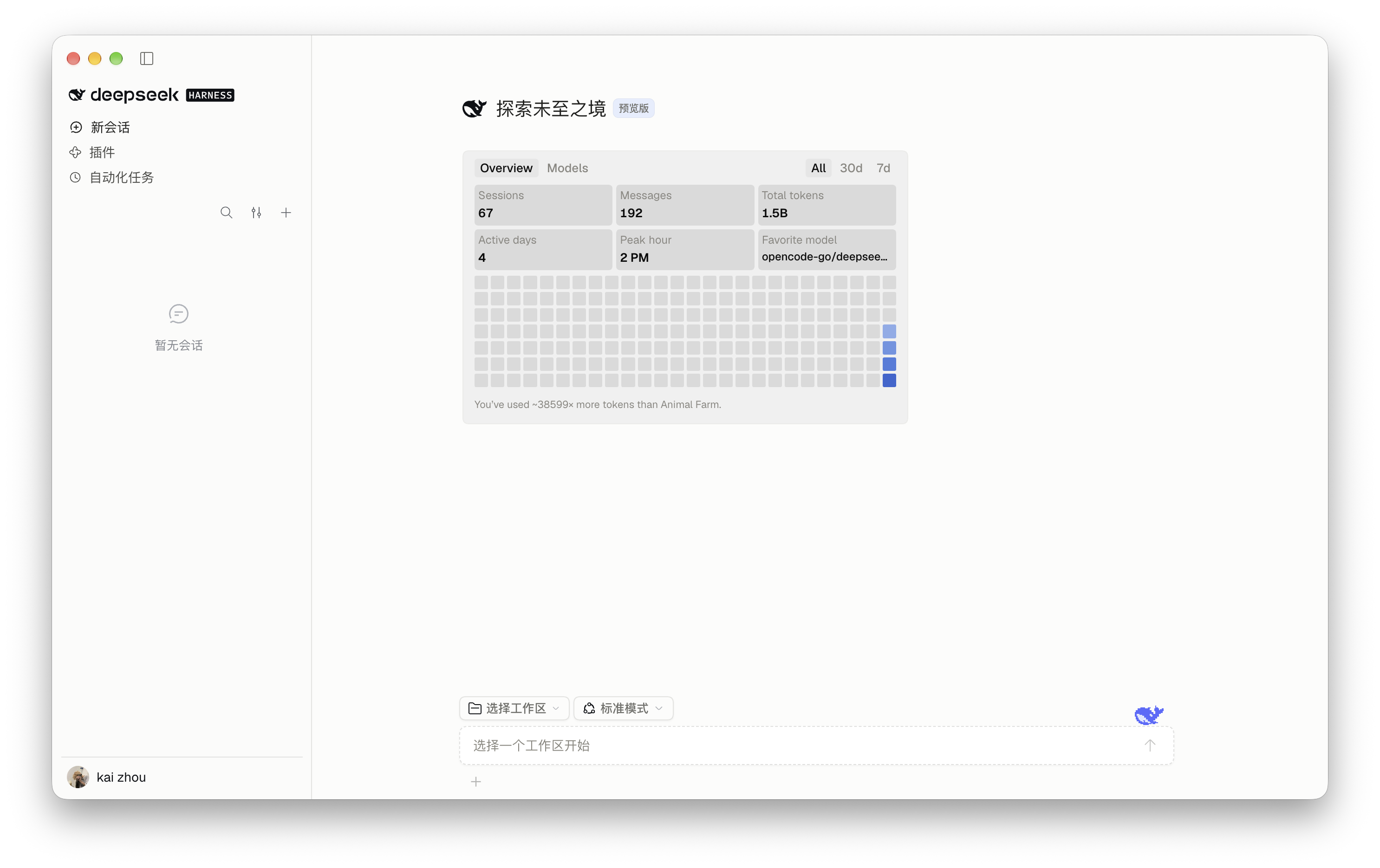 | 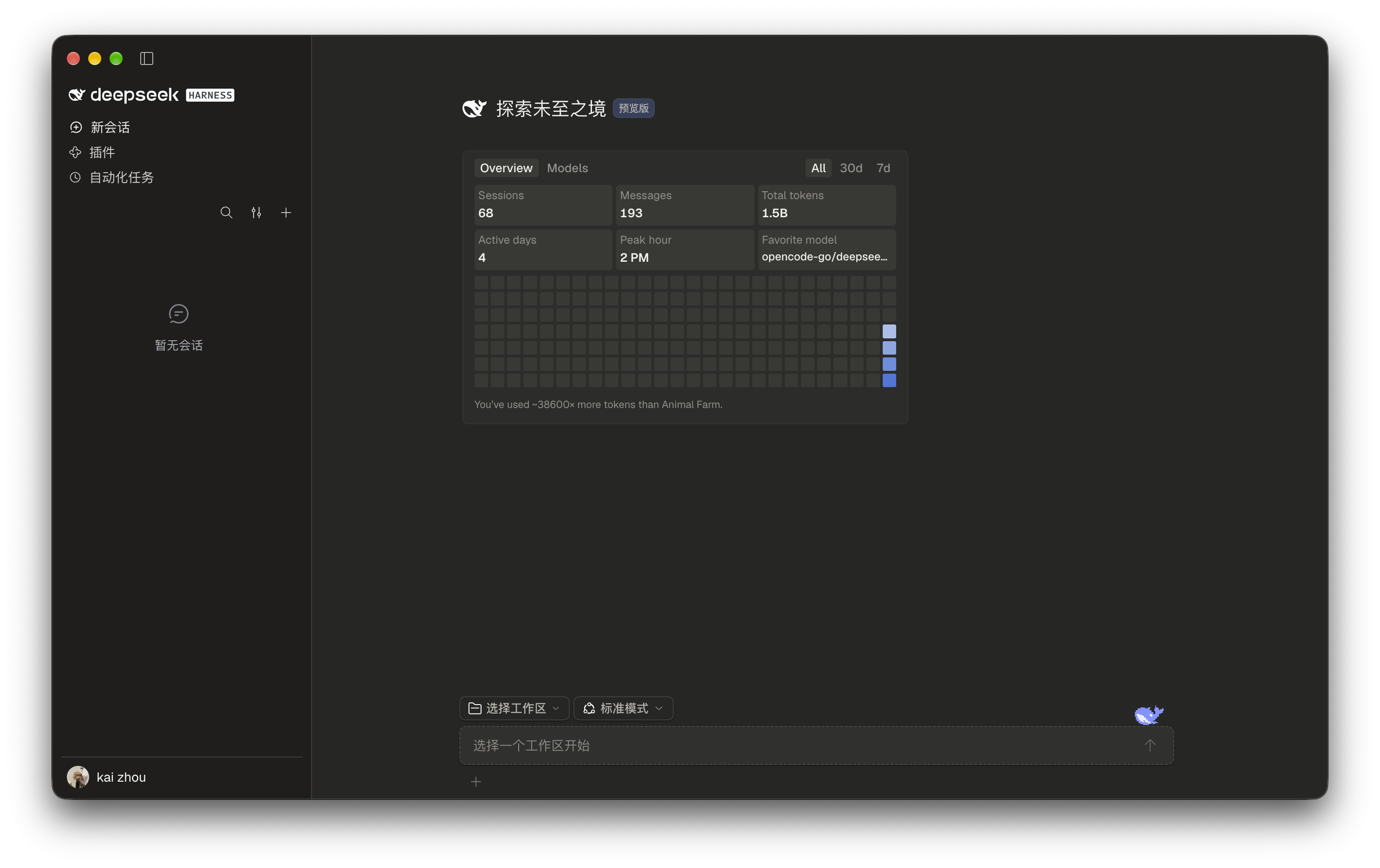 | | 聊天页 | 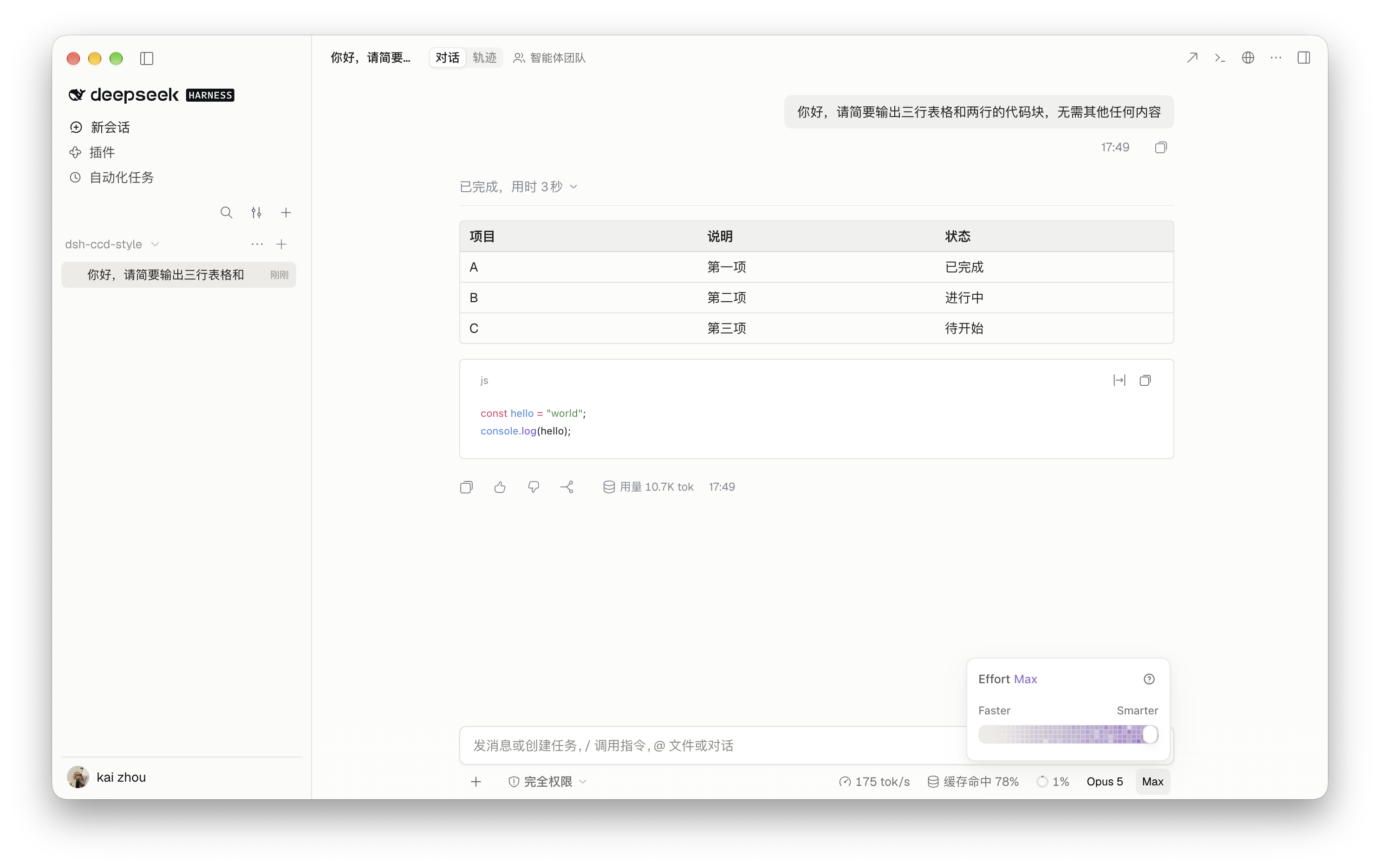 | 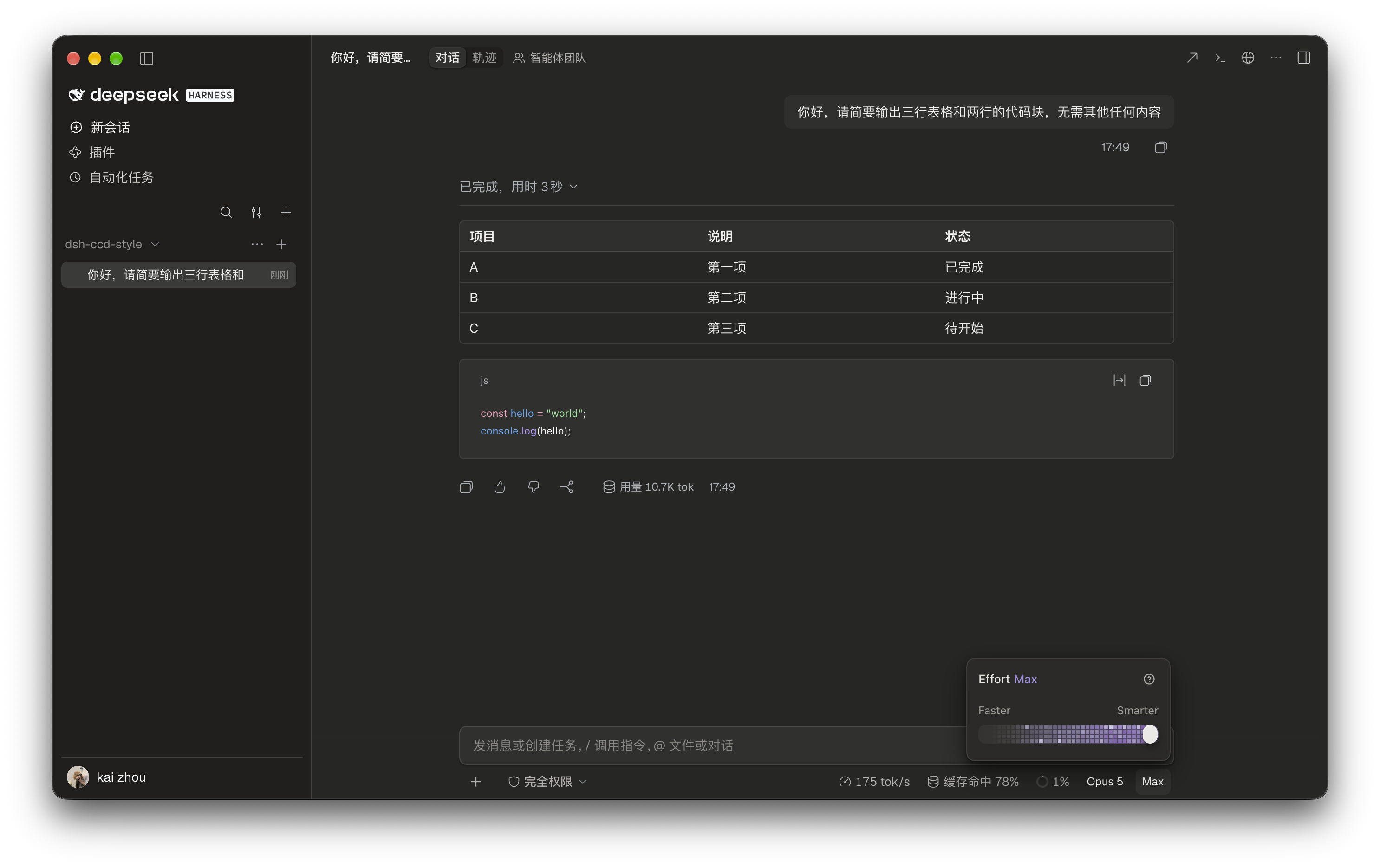 | | 插件设置 | 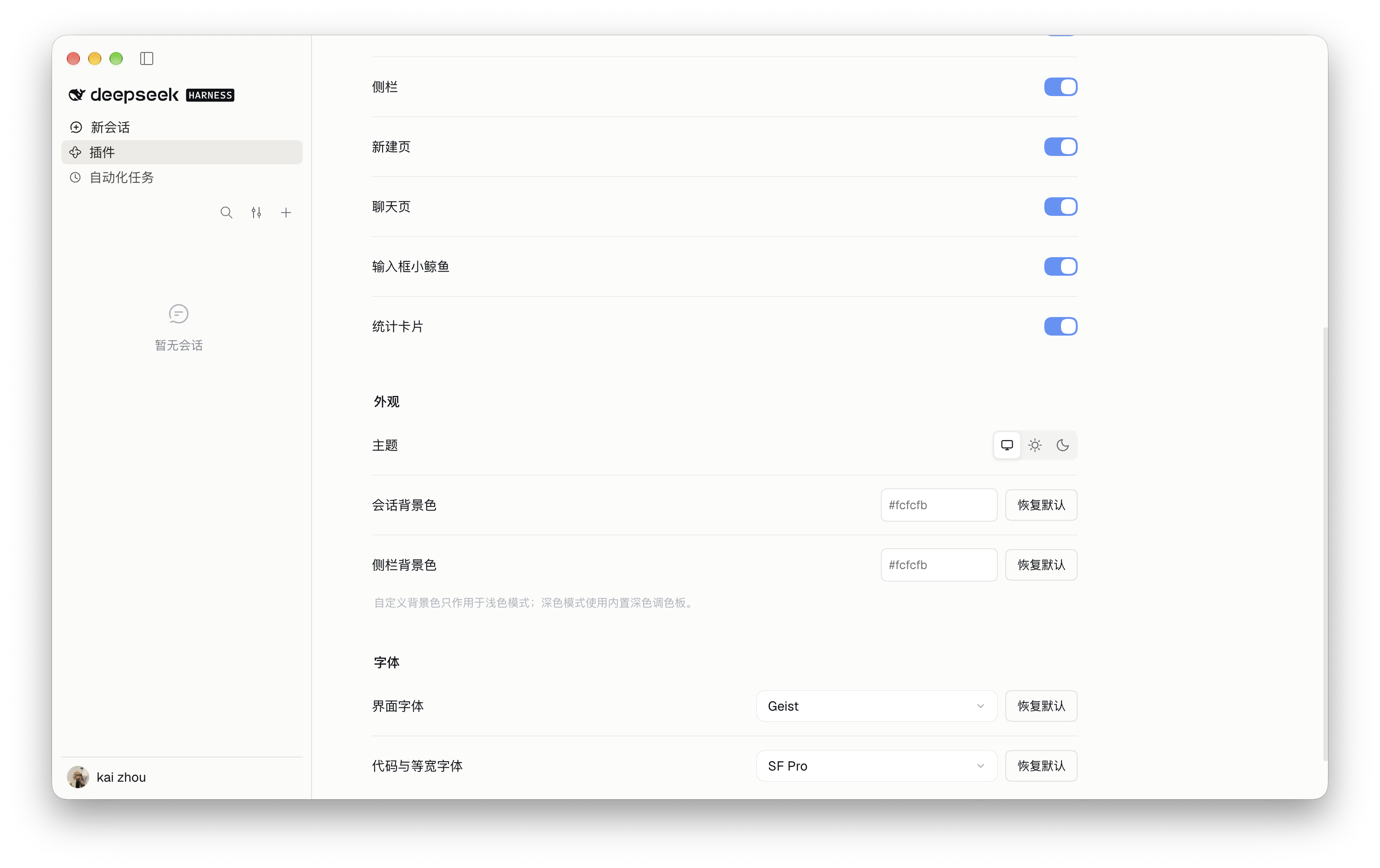 | 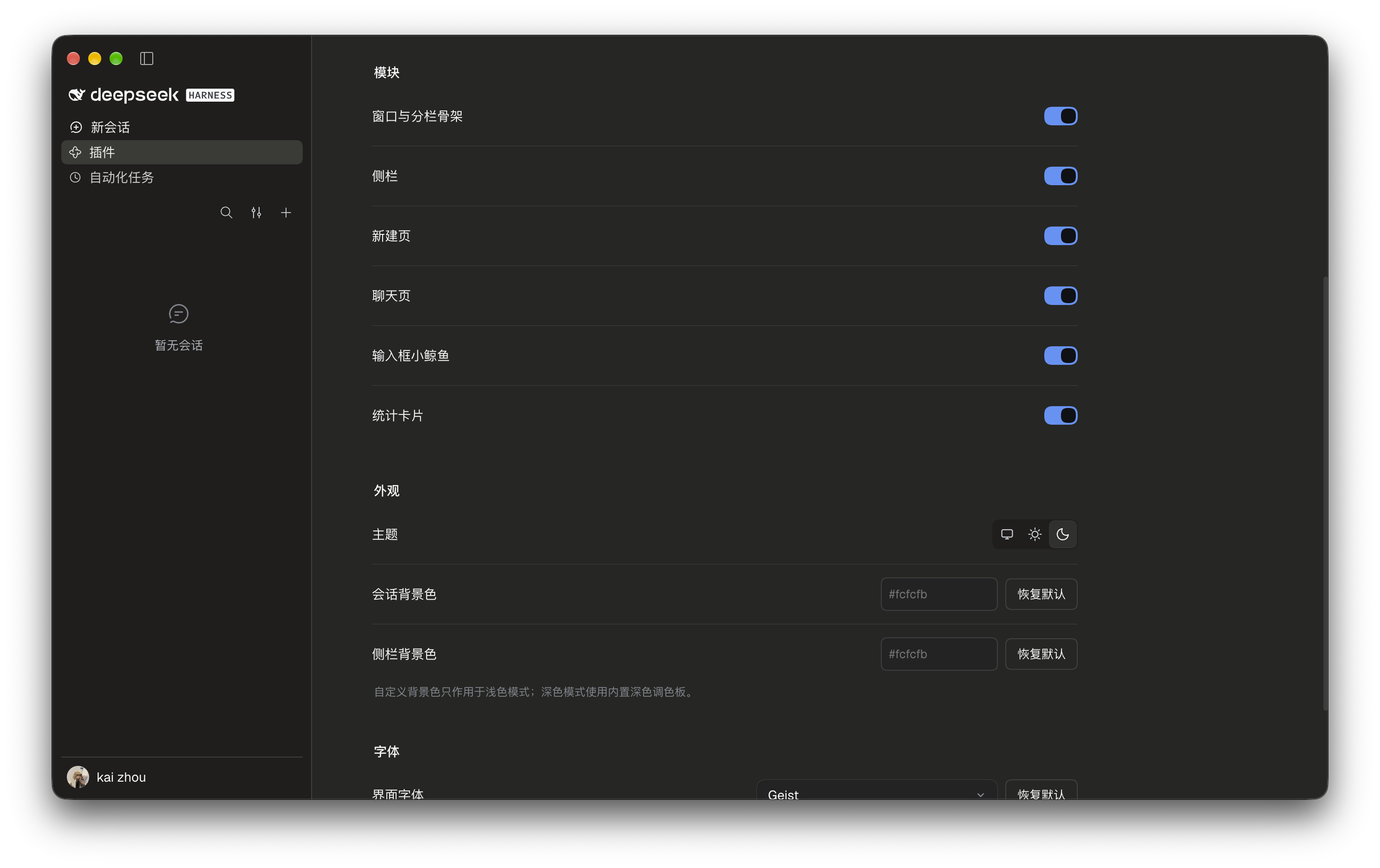 | </div> ## ⚙️ 配置 打开「插件 → dsh-claude-desktop-theme」,调整总开关、模块、主题、颜色和字体。改动即时生效。 <div align="center"> | 分组 | 可调项 | | --- | --- | | 模块 | 窗口与分栏骨架、侧栏、新建页、聊天页、输入框小鲸鱼、统计卡片、状态栏统计读数、上下文分解面板 | | 外观 | 主题(浅色 / 深色 / 跟随系统)、会话背景色、侧栏背景色 | | 字体 | 界面字体、代码与等宽字体 | </div> > [!NOTE] > 自定义背景色只作用于浅色模式,深色模式使用内置深色调色板。界面默认使用 Geist,未安装时回退系统字体;仓库的 `assets/fonts/` 提供本机安装用字体与 OFL 许可,字体不包含在 npm 包中。 ## 🛠️ 环境要求 <div align="center"> | 项目 | 要求 | | --- | --- | | 宿主 | DSH `0.2.0-rc.2` | | 平台 | macOS(Apple 芯片)、Windows 10 及以上(64 位) | | 主题 | 浅色、深色与跟随系统 | | 开发环境 | Node.js ≥ 22.18.0 | </div> ## 🧑💻 开发 ```sh npm ci --cache .cache/npm npm run check npm run pack:local --cache .cache/npm ``` `npm run check` 依次执行类型检查、模块边界与文档链接检查、测试、构建和包内容校验。本机有 Chrome 时,测试还会在真实浏览器中验证视图选项二级菜单的鼠标命中、跨菜单间隙与键盘操作,以及上下文分解面板的两态、锚定几何、分段间隙与浅深配色;没有 Chrome 时跳过这一项,可用 `CHROME` 指定浏览器路径。 <details> <summary><b>全部脚本</b></summary> | 脚本 | 作用 | | --- | --- | | `npm run typecheck` | TypeScript 类型检查 | | `npm run check:architecture` | 模块边界、颜色归属与本地文档链接 | | `npm test` | 配置、生命周期、布局适配与统计行为测试 | | `npm run build` | 构建 Host 与 Client 产物 | | `npm run check:package` | 校验 npm 安装包内容 | | `npm run check` | 依次执行以上全部 | | `npm run dev` | 客户端增量构建 | | `npm run pack:local` | 生成用于本地安装的 tarball | | `npm run pet:gifs` | 重新渲染 README 里小鲸鱼的三个动图(需已安装 Chrome 与 ffmpeg) | | `npm run effort:gifs` | 重新渲染 README 里 Effort 拉到底的深浅两个动图(同上) | </details> 代码结构见 [ARCHITECTURE.md](https://github.com/zkforge/dsh-claude-desktop-theme/blob/main/ARCHITECTURE.md)。 ## 📮 反馈与许可 通过 [Issue](https://github.com/zkforge/dsh-claude-desktop-theme/issues) 反馈问题,附上 DSH 版本、窗口尺寸和复现步骤。 [MIT](./LICENSE) © 2026 zkforge。
Install
dsh plugin --profile web add github:zkforge/dsh-claude-desktop-theme
Profile: web
With the hub plugin installed, ask your agent to install it by name — it resolves the same plan shown here.
dsh plugin --profile web add github:stvlynn/dsh.fish#path:packages/dsh-plugin-hub
install dsh-claude-desktop-theme from the hub
- This package builds from source on install. pnpm will ask you to allow its build script — that is permission to run the package’s code on your machine, outside the agent sandbox. Only allow sources you trust.
- This source has no pinned commit, so a later push upstream changes what installs. Prefer pinning a commit.