Bundle
dsh-automation-center
A global Automation Center with fresh, auditable scheduled Agent runs for DeepSeek Harness
- Source
- usersx
- stars
- 1 stars
- License
- MIT
- Updated
- Updated 5 days ago
Readme
# DSH Automation Center
中文 | [English](README.en.md)
[](https://github.com/usersx/dsh-automation-center/actions/workflows/ci.yml)
[](https://www.npmjs.com/package/dsh-automation-center)
[](LICENSE)
> 题图是“DeepSeek 鲸鱼娘与自动化”的项目插画,不是产品界面截图。功能截图均使用 DSH `0.1.0-rc.8` 原版 DeepSeek 官方皮肤。

DSH Automation Center 为 [DeepSeek Harness](https://github.com/deepseek-ai/deepseek-harness) 提供可计划、可审计的自动化任务。每次触发都会在指定 Workspace 中创建新的根 Agent 和 Result Session;任务定义、计划、权限与运行历史由 Automation Center 管理,完整结果和轨迹保存在 Result Session 中。
当前版本会按 DSH 能力选择原生界面,不注入 DOM,也不替换 Sidebar:
- **原版兼容模式**:未修改的 DSH `0.1.0-rc.8` 至最新 `0.1.2-alpha.2` 在“设置 → 自动化”提供全局管理页,无 Session 也能进入;Session 内的“自动化”标签作为快捷入口。普通用户可直接安装,不需要 Shell Page Patch。
- **全局中心模式**:当 DSH 提供 `sidebar.primary.action` 与 `shell.page` 时,自动升级为“新会话”下方、“工作区”上方的全局入口,无需先打开 Session。
> 当前版本:`0.1.0-alpha.8`。兼容性通过不等于安全审计通过。
## 从 GitHub Release 安装 Alpha.8
先下载 [dsh-automation-center-0.1.0-alpha.8.tgz](https://github.com/usersx/dsh-automation-center/releases/download/v0.1.0-alpha.8/dsh-automation-center-0.1.0-alpha.8.tgz),再从下载目录安装。
Web Profile:
```sh
dsh plugin --profile web add ./dsh-automation-center-0.1.0-alpha.8.tgz
```
Desktop Profile:
```sh
dsh plugin --profile desktop add ./dsh-automation-center-0.1.0-alpha.8.tgz
```
Release 同时提供 [SHA-256](https://github.com/usersx/dsh-automation-center/releases/download/v0.1.0-alpha.8/dsh-automation-center-0.1.0-alpha.8.tgz.sha256)、[SPDX SBOM](https://github.com/usersx/dsh-automation-center/releases/download/v0.1.0-alpha.8/dsh-automation-center-0.1.0-alpha.8.spdx.json) 和 GitHub/Sigstore 构建证明。npm 是否发布完成必须以 registry 的固定版本、integrity 与 provenance 回读为准,不能用 GitHub Release 或 workflow approval 代替。
安装后完整退出并重新打开 DSH,让 Host Bundle 在启动时挂载。不要只刷新网页。Node.js 需使用 DSH 支持的 `^22.19.0` 或 `>=24.0.0`。
如果旧的 `@dsh-external/dsh-automation` 正在运行,请先停用或移除;新插件检测到双 Scheduler 时会报告 `AUTOMATION_PLUGIN_CONFLICT`,不会静默重复调度。
## 为什么需要 Automation Center
Automation 不属于某个聊天 Session。`alpha.6` 因此把原版 DSH 的权威管理入口放进全局 Settings;增强 Shell 还可以把同一页面提升到左侧一级入口:
- 无需先打开 Session;
- 跨 Workspace 查看任务、计划、最近运行和失败项;
- 使用完整根页面,而不是弹窗;
- 每次运行都有独立、可审计、可直接打开的 Result Session;
- 入口外壳由 DSH Sidebar 渲染,与“新会话”保持同宽、同中心线和同皮肤。
## 功能
- 全 Workspace 总览、Workspace 筛选、统计卡片与最近运行。
- 一次性、固定间隔、每日和每周计划;显式 IANA 时区与下次运行预览。
- 创建、编辑、暂停、恢复、删除、立即运行和取消。
- 每次 occurrence 创建新的根 Agent 和 Session,不复用聊天会话。
- Result Session 使用自动化任务名作为标题,而不是 Workspace 或项目名。
- “只读”和“Workspace 可写”两种无人值守权限。
- 每个任务可选择“运行时继承 DSH 默认模型”,或固定 provider、model 和 reasoning effort;运行历史记录实际模型。
- 保存与运行前检查 Workspace、Preset 和模型;不可用目标显示为 `blocked`,不会先创建无效 Session。
- 创建幂等、防重叠、确定性 occurrence 领取、有限 misfire 补偿与保守的 Host 重启恢复。
- `claim / setup / executing / settling / delivery` 阶段、租约心跳与覆盖完整作业的超时。
- 派生 expected/admitted/claimed/queue/progress 健康,以及结构化 Outcome/Attention、attempt 与副作用不确定性。
- 可选 Git worktree 隔离审阅:干净 base、patch hash/stat、accept/keep/discard,源工作区漂移时 fail closed。
- 生命周期事件带 runId/revision/sequence;模型只看到无人值守策略实际允许的工具。
- Run 对外提供由 Definition revision、occurrence 与 Workspace scope 组成的稳定 identity;不按列表位置或动态同名节点恢复。
- Host、存储与 Git review cleanup 在异步 settle 前持续保有 owner;中断的 accept/discard 会在重启后对账。
- 所有写操作返回持久 Receipt(request ID、revision、`committed / rejected / unknown`),Client 随后读取权威状态。
- 持久运行历史、摘要、Result Session 入口、实际模型和结构化错误码。
- 只读导入旧 `dsh_automation` v1 数据,原存储域保持不变。
## 原版 DeepSeek 界面截图
以下功能截图全部使用原版 DeepSeek 皮肤。
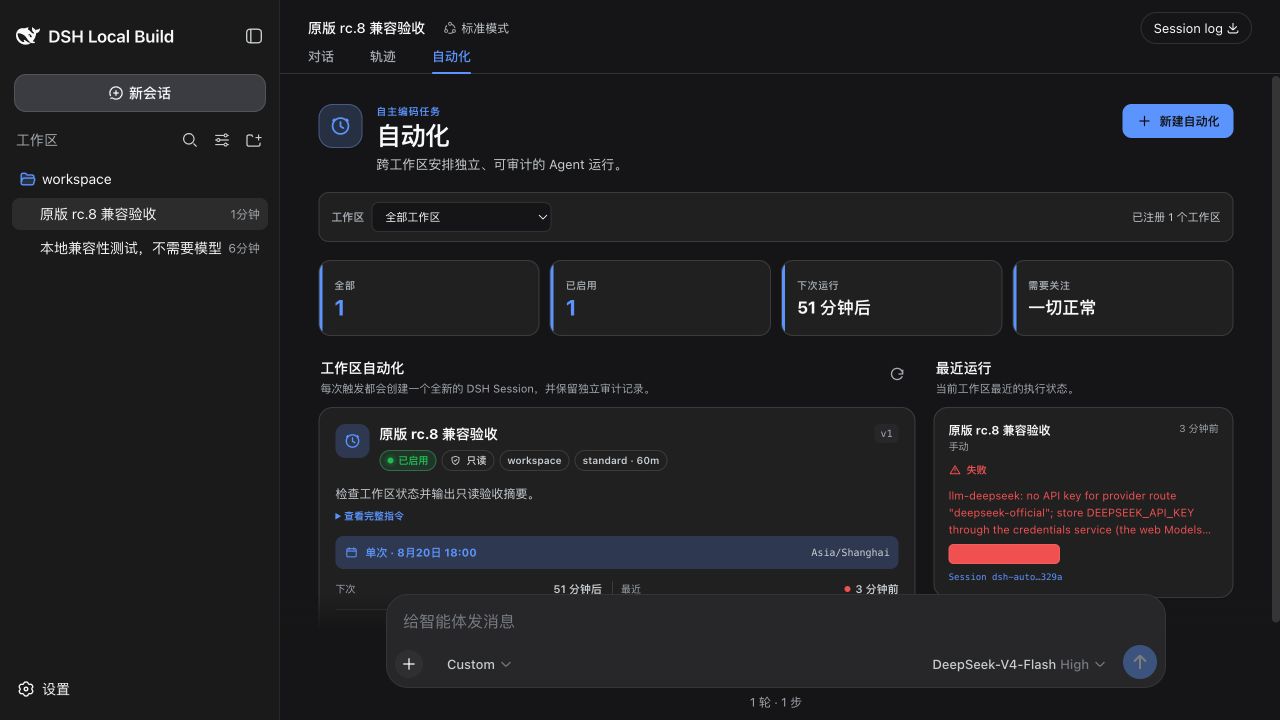
### 0. 原版 rc.8 兼容模式(深色)
未修改的 rc.8 将入口放在“对话 / 轨迹”旁;下图同时展示任务卡片、结构化失败记录,以及为会话输入框保留的底部净空。
以下三张截图展示提供两个 Shell Slot 后的 **全局中心模式**。
### 1. 与“新会话”同级且居中
<p align="center">
<img src="https://raw.githubusercontent.com/usersx/dsh-automation-center/main/docs/assets/sidebar-expanded-fixed.png" alt="原版 DeepSeek 展开侧栏中的自动化入口" width="68%">
<img src="https://raw.githubusercontent.com/usersx/dsh-automation-center/main/docs/assets/sidebar-collapsed-fixed.png" alt="原版 DeepSeek 折叠侧栏中的自动化入口" width="18%">
</p>
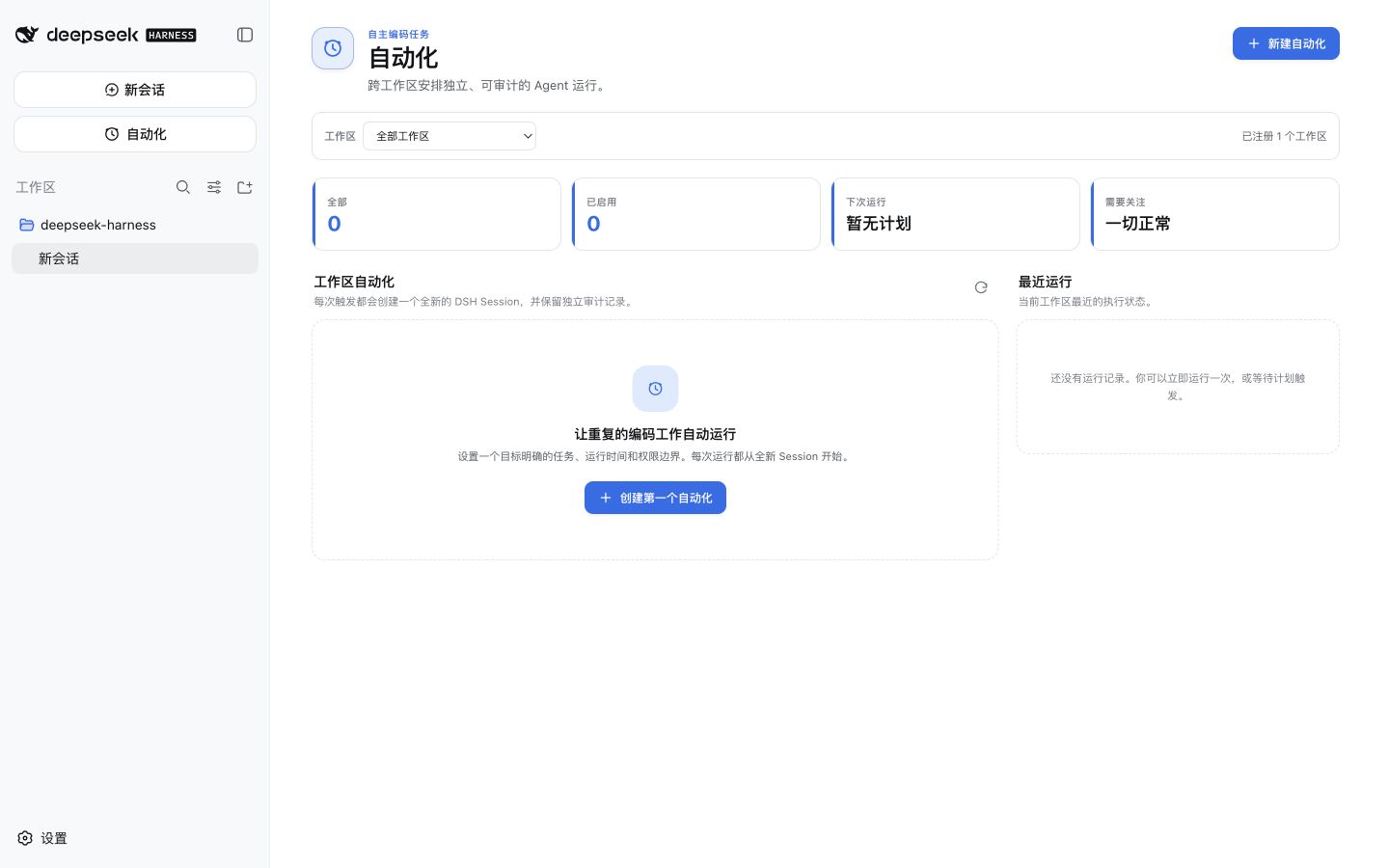
### 2. 全局 Automation Center
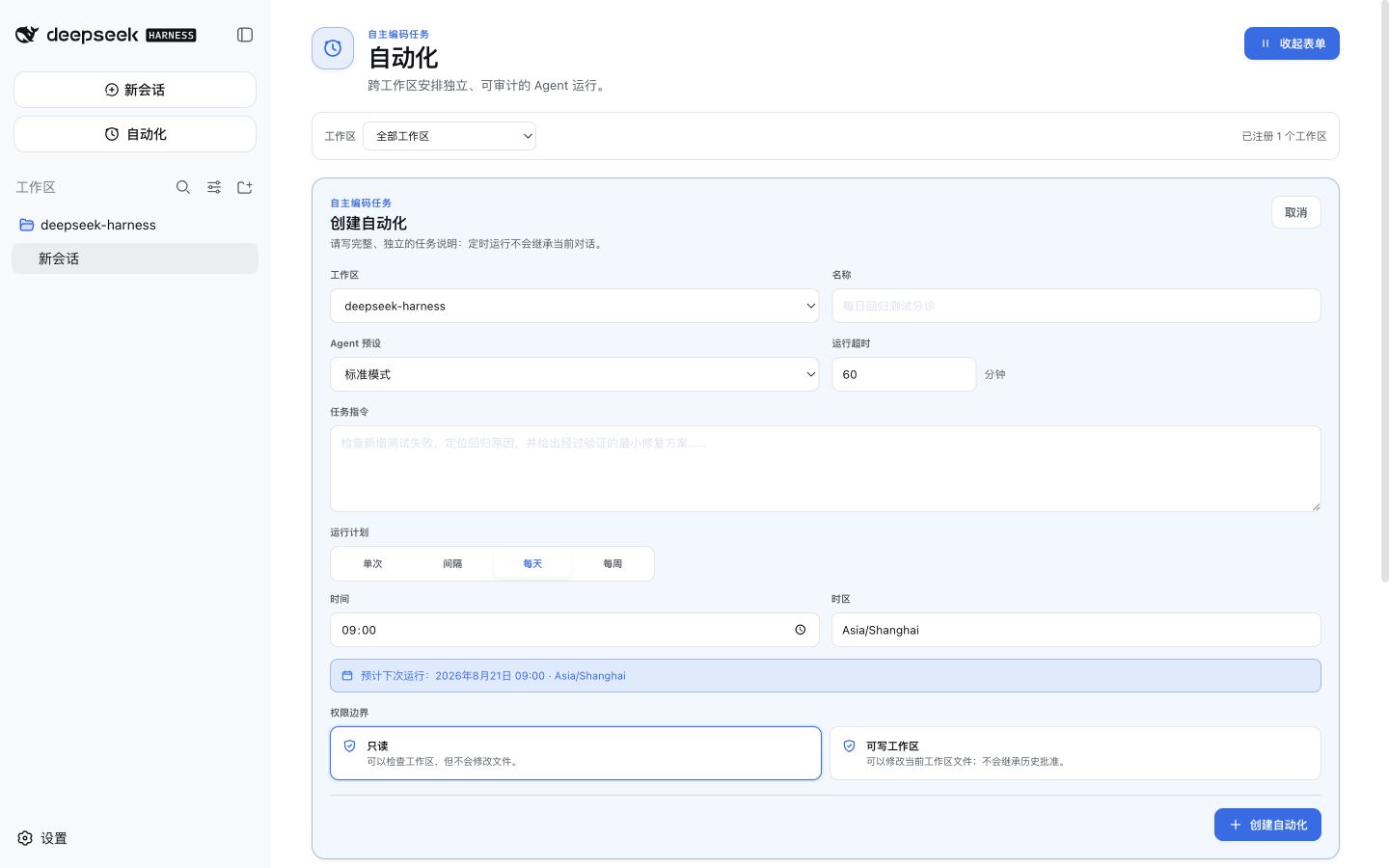
### 3. 创建自动化任务
## 使用方法
1. 原版兼容模式:打开“设置 → 自动化”,也可以从任一 Session 顶部的“自动化”快捷标签进入。全局中心模式:直接点击左侧栏“自动化”。
2. 点击“新建自动化”或“创建第一个自动化”。
3. 填写名称、任务指令、Workspace、计划、时区、Agent Preset、模型策略、权限和超时。
4. 检查下次运行预览并保存。
5. 等待计划触发,或点击“立即运行”。
6. 在“最近运行”查看摘要,并打开 Result Session 查看完整结果。
建议先用“只读”权限和无外部副作用的小任务验证配置,再逐步开放 Workspace 写权限。
## 工作原理
```text
DSH Surface Adapter
├─ stock 0.1.0-rc.8 → 0.1.2-alpha.2: settings.section + conversation.view shortcut
└─ enhanced: sidebar.primary.action + shell.page
│
▼
Automation Center ──RPC──▶ AutomationEngine ──▶ Definition / Run 存储
│
计划、立即运行或恢复调度
│
▼
Fresh Agent + Fresh Session
│
▼
Result Session + 审计记录
```
复杂度集中在 Host 侧 `AutomationEngine`。两个 Client Surface Adapter、受认证 RPC、Scheduler 和 Agent Tools 都复用同一个 `snapshot` / `dispatch` 边界,不直接读写存储域。
## 兼容性
| 目标 | 安装 | 界面 | 状态 |
|---|---|---|---|
| 原版 DSH `0.1.0-rc.8` / Web | 无需 Patch | Settings 全局页 + Session 快捷标签 | Alpha.6 完整 Web 端到端通过 |
| 原版 DSH `0.1.1-rc.2` / Web | 无需 Patch | Settings 全局页 + Session 快捷标签 | npm 固定版本安装、Host/Client 激活、无 Workspace 空状态和浏览器 console 验收通过;完整 Agent Run 未重复执行 |
| 原版 DSH `0.1.2-alpha.1` / Web | 无需 Patch | Settings 全局页 + Session 快捷标签 | Alpha.7 本地 tarball 安装、Host/Client、创建/运行、失败终态、Result Session 与 Attention readback 通过;真实模型成功 Run 待最终验收 |
| 原版 DSH `0.1.2-alpha.2` / Web | 无需 Patch | Settings 全局页 + Session 快捷标签 | Alpha.8 候选包安装、Host/Client、Definition、direct/worktree 失败链路、Result Session、Attention 与幽灵 Session 负向通过;真实模型成功 Run 未运行 |
| macOS DSH Desktop `2.0.3`(内置 DSH `0.1.1-rc.2`) | 无需 Patch | Settings 全局页 + Session 快捷标签 | Alpha.7 最终 tgz 升级、真实模型成功 Run、结构化 Outcome、Result Session 与三次冷启动通过 |
| 提供两个 Shell Slot 的 DSH / Web | 无需插件改动 | 全局根入口和独立页面 | 已观察通过 |
| Windows / Linux 原生 Desktop | — | 随目标 DSH 能力自动选择 | 尚未实机验收 |
截至 `0.1.2-alpha.2`,原版 DSH 仍没有 `sidebar.primary.action` 和 `shell.page`,所以插件无法只靠公开 API 在“新会话”下方增加根入口。为了保证可卸载、可维护和主题兼容,本项目不使用 DOM 注入模拟该入口。两个 Slot 一旦进入 DSH 上游,同一个 npm 包会自动启用全局中心模式。
精确的通过、阻塞和未运行项见 [Alpha.8 验收结果](docs/acceptance-results-2026-08-31-alpha.8.md);Alpha.7、Alpha.6 与 Alpha.5 历史记录仍保留作为既有实机基线。
## 配置
| 配置项 | 默认值 | 说明 |
|---|---:|---|
| `maxConcurrentRuns` | `2` | 全局同时运行的最大 Run 数,范围 1–32 |
| `runTimeoutMinutes` | `60` | 默认单次运行超时,范围 1–1440 分钟 |
| `misfireGraceMinutes` | `15` | Host 暂停后的有限补偿窗口 |
| `historyLimit` | `200` | 每个 Automation 保留的 Run 上限 |
| `archiveRunSessions` | `false` | 完成后是否归档 Result Session;Run 审计行仍保留 |
## 安全边界
- 管理 RPC 在 rc.8/rc.2 使用 Loopback authority,在 alpha.1/alpha.2 使用一次性 Token 认证通道;所有写入仍校验 Workspace/Profile scope。
- UI 只能提交已注册的 Workspace ID,不能传任意宿主绝对路径。
- Automation Agent 不能递归创建 Automation,也不能等待人工授权。
- 无人值守工具使用白名单,并拒绝后台进程逃逸。
- Host 重启后不盲目重试可能已经产生副作用的中断 Run。
- 日志和 RPC 错误不得输出 Prompt、Token、环境变量或凭证。
- 取消只能终止后续执行,无法回滚已经完成的副作用。
## 开发与验证
```sh
pnpm install
pnpm check
```
CI 在 Linux、macOS 和 Windows 上执行类型检查、测试、构建与仓库检查,并把打包后的插件分别安装到未修改的 DSH `0.1.0-rc.8`、`0.1.1-rc.2`、`0.1.2-alpha.1` 与 `0.1.2-alpha.2` 隔离 Profile。Release workflow 会生成固定 tarball、SHA-256、SPDX SBOM 与 GitHub/Sigstore 制品证明;npm 发布只在 workflow 与 registry 回读成功后才算完成。
## 文档
- [验收标准](https://github.com/usersx/dsh-automation-center/blob/main/docs/acceptance-criteria.zh-CN.md)
- [Alpha.8 验收结果](https://github.com/usersx/dsh-automation-center/blob/main/docs/acceptance-results-2026-08-31-alpha.8.md)
- [技术方案](https://github.com/usersx/dsh-automation-center/blob/main/docs/technical-design.zh-CN.md)
- [发布流程](https://github.com/usersx/dsh-automation-center/blob/main/docs/releasing.md)
- [更新日志](CHANGELOG.md)
- [贡献指南](CONTRIBUTING.md)
- [安全策略](SECURITY.md)
- [实施路线](ROADMAP.md)
- [第三方代码声明](THIRD_PARTY_NOTICES.md)
## 从源码安装
```sh
git clone https://github.com/usersx/dsh-automation-center.git
cd dsh-automation-center
pnpm install
pnpm check
npm pack
dsh plugin --profile web add ./dsh-automation-center-0.1.0-alpha.8.tgz
```
## 已知限制
- 原版 DSH `0.1.2-alpha.2` 可在 Settings 提供全局管理页,但左侧栏一级入口仍需要上游提供两个通用 Shell Slot。
- `0.1.2-alpha.2` Web 已完成 Alpha.8 候选包的安装、激活、RPC、direct/worktree 失败链路、Result Session 与幽灵 Session 负向验收;真实模型成功 Run 未运行。macOS Desktop 2.0.3 的 Alpha.7 真实模型成功 Run 与三次冷启动仍是历史基线。
- 第一版不提供分布式 Scheduler、远程执行节点或云端凭证托管。
- 取消不会撤销已经发生的文件修改或外部调用。
- 当前仍是 Alpha;稳定版发布条件以验收文档为准。
- DSH `0.1.2-alpha.2` 自身尚不能证明复杂 secret-bearing Settings schema 的 wire 脱敏安全;本插件 Config 不声明 secret 字段并隐藏内部错误文本,但共存插件的复杂 schema 仍需上游 fail-closed 修复后复验。
## 许可证
[MIT](LICENSE)
Install
dsh plugin --profile web add github:usersx/dsh-automation-center
Profile: web
With the hub plugin installed, ask your agent to install it by name — it resolves the same plan shown here.
dsh plugin --profile web add github:stvlynn/dsh.fish#path:packages/dsh-plugin-hub
install dsh-automation-center from the hub
- This package builds from source on install. pnpm will ask you to allow its build script — that is permission to run the package’s code on your machine, outside the agent sandbox. Only allow sources you trust.
- This source has no pinned commit, so a later push upstream changes what installs. Prefer pinning a commit.